




If you’ve been on the site this week, you’ve probably noticed it looks different. This week we shipped the biggest change our catalogue has ever had: eight new WooCommerce plugins, a free block theme called Vitrine with nine finished starter stores, and bundles that put everything on one license. It landed in the middle of Black Friday week, so everything is 40% off until December 1.
A “look what we made” post is easy to skip, so this one sticks to what helps you decide: which problem each new plugin is for, how to try them without touching your live store, and how to get the discount without installing anything new on your busiest weekend of the year.
Why we sorted everything by the shopper’s next step
The old catalogue was a list of plugin names. That’s fine if you already know you want a floating cart, and not much help if all you know is that people land on your shop and leave.
So the plugins page now follows the steps a shopper takes: finding a product, choosing it, buying it, and the store around all of that. If your problem is “people can’t find things,” start in Find. If they find things and don’t buy, look at Choose and Buy. Every plugin in the catalogue has a Free version, and they all run on the same framework, so once you’ve set up one, the next feels familiar.
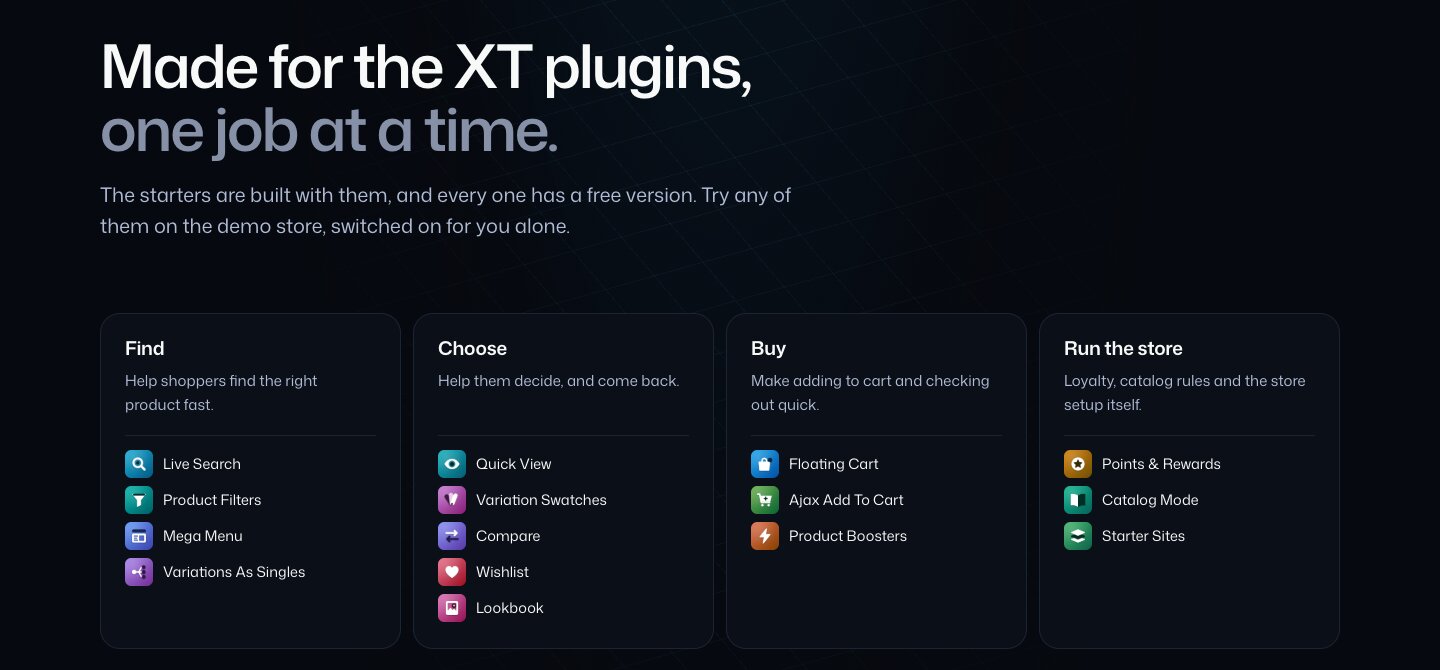
Find: search, filters, menus
Three of the new plugins live here, next to Variations As Singles.
- Live Search shows results as shoppers type, forgives typos, and never leaves them staring at an empty box. Even the free version reports the searches that found nothing, and that list tells you what to stock or rename better than any survey. Pro lets you steer what search shows.
- Product Filters puts a count beside every choice, opens as a drawer on phones, and avoids dead ends where a combination returns zero products. Pro adds an index table for big catalogues, variation-aware filtering and SEO landing pages.
- Mega Menu builds mega menus with blocks right in your header, in your theme’s colours, with a phone menu and full keyboard support.
Before you pick between these, look at your category names and product titles. Clear naming fixes a lot of “can’t find it” problems before any plugin does, and it makes search and filters work better once you add them.
Choose: wishlist, compare, lookbook
This is where people decide, or decide to come back later. Three of the new plugins sit here, beside Variation Swatches and Quick View.
Wishlist puts a heart on every product and keeps a wishlist page that shows what got cheaper since it was saved. Guests can save without an account, and their list joins their account when they sign in. The free version is a complete wishlist: sharing by link or QR code, a header counter, and a most-wished report. Pro adds named lists, gift registries and the emails that bring shoppers back.
Compare lays products side by side, highlights the differences and marks the lowest price. It earns its place in stores where the products look alike and the specs don’t (electronics, tools, mattresses). Pro adds spec rows, quick compare and comparison pages.
Lookbook is the one I’d point fashion and home stores at. Your campaign photos already show the products, and Lookbook lets shoppers buy them straight from the photo.
Buy: Product Boosters
Floating Cart and Ajax Add To Cart were already here. The new one is Product Boosters: a sticky add-to-cart bar, size guides, frequently bought together, delivery dates and stock urgency, each one a switch you can turn on by itself. Pro adds social proof from real orders, an offer bar and A/B tests.
Please don’t turn on every booster at once. A product page with a countdown, an urgency badge, a delivery date and a bought-together row all fighting for attention converts worse than a calm one. Pick the one that answers the question your shoppers ask most (usually “when will it arrive?” or “will it fit?”) and start there.
Run the store: Starter Sites and the Vitrine theme
Vitrine is a free WooCommerce block theme, GPL licensed, built for the Site Editor. Every store page has a template you can edit: shop, product, cart, checkout, order confirmation and the customer account. It uses WooCommerce’s Cart and Checkout blocks, follows the shopper’s light or dark setting, and the shop and product templates use WooCommerce’s Classic Template block, so extensions that hook into the classic templates keep working.
The new Starter Sites plugin imports one of nine finished stores built for Vitrine, each with its own products, pages, photographs and palette: fashion, electronics, beauty, jewellery, coffee, furniture, home goods, tailoring and streetwear. You can import a whole store or only the parts you pick, and remove it later with your settings put back. North&Co, Sage Goods and Tonvik are free. The other six come with yearly Starter Sites Pro or any yearly bundle.
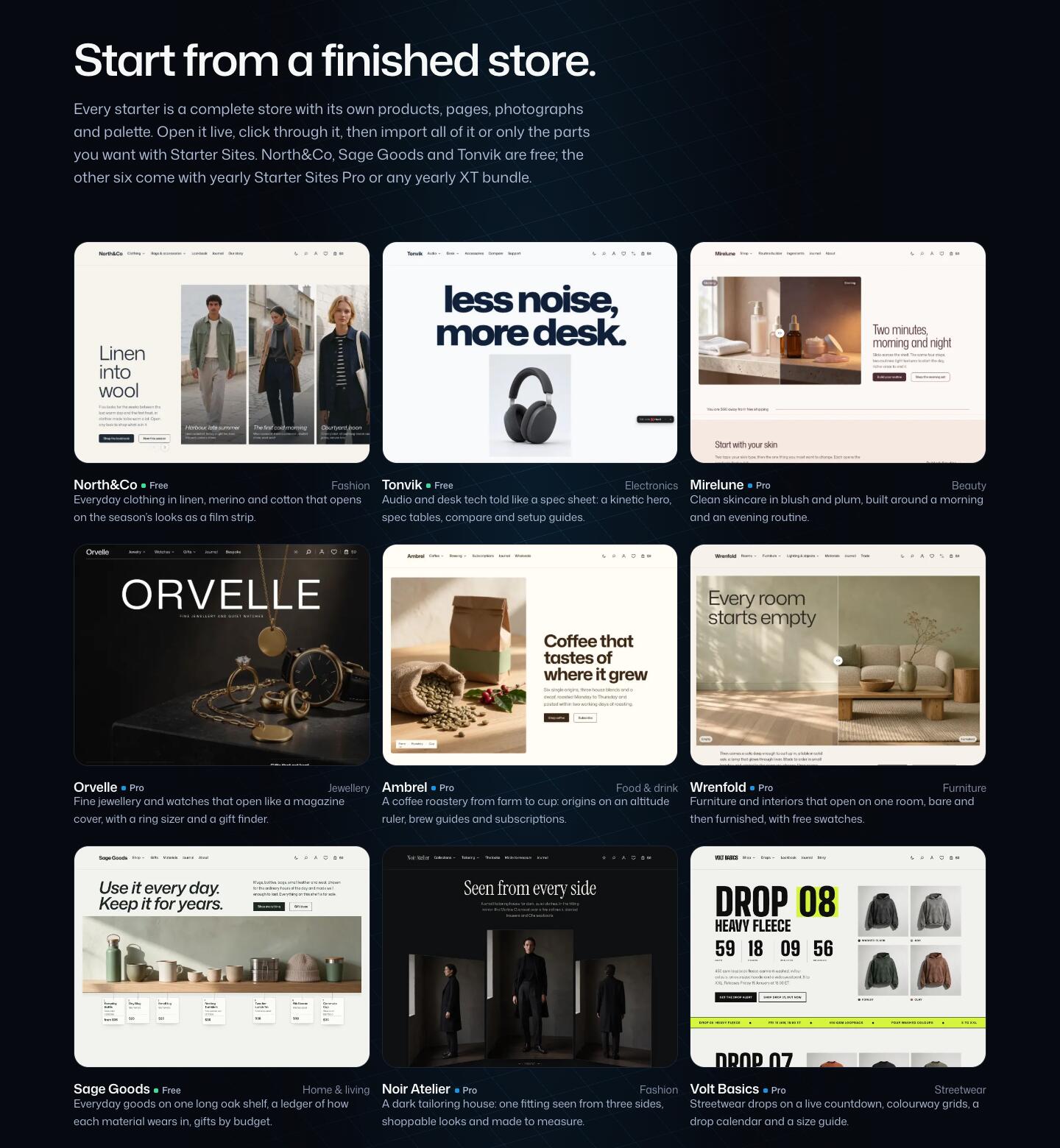
The new plugins are on their way to WordPress.org, and you don’t have to wait for them: each plugin page has a Download free button, and the copy you install keeps updating. Vitrine is headed to WordPress.org too, and until it’s listed you can click through it on the live demos. The Pro versions are available today, and every Pro plan starts with a free trial.
Try it before you install anything
Every plugin page has a Live demo button. The demo store runs on Vitrine, and it switches on the plugin you came from for you alone, so you can click through a real store with that plugin working instead of looking at screenshots. The nine starter stores are live too; open any of them from the Vitrine page.
Then, when you do install, do it on a staging copy first. WooCommerce’s own guide to testing for plugin and theme conflicts recommends a backup and a staging site for exactly this reason: you can test on a clone of your store without risking the one that’s taking orders.
Getting the sale without breaking your Black Friday
Two weeks ago I wrote about freezing plugin changes before Black Friday, and I still mean it. Please don’t install a new plugin on your live store this weekend because it’s on sale.
You don’t have to. The sale runs from November 23 to December 1, and the 40% comes off at checkout, so the prices on the plugin pages already show it. Buy this week if something fits, then install it on staging next week, once your sale traffic has calmed down. Every purchase has a 30-day money-back guarantee, which gives you plenty of room to test it properly after the rush and ask for a refund if it isn’t right for your store.
A few numbers so you can compare, all on the yearly plan for one site with the sale applied:
- A single Pro plugin is $35.40 a year instead of $59 (Quick View is $23.40 instead of $39).
- Essentials is $77.40 instead of $129: the five plugins most stores add first, plus Starter Sites.
- Growth is $107.40 instead of $179: ten plugins for a store that’s growing its catalogue, plus Starter Sites.
- All Access is $149.40 instead of $249: every XT plugin, including the ones we release while you’re a member.
Monthly plans, and licenses for 3 or 30 sites, are on the bundles page with the same 40% off. One thing to know if the starter stores are the reason you’re buying: the six Pro starters come with yearly plans only. Monthly plans include the tools.
Which one I’d start with
Match the plugin to the place shoppers drop off:
- People search and leave: Live Search, then Product Filters.
- People browse a lot and buy little: Wishlist, so they have a reason to come back.
- People ask the same pre-sale questions: Product Boosters with a size guide or delivery dates.
- You’re starting a new store or rebuilding one: Vitrine and a starter, then add plugins as you need them.
And if you’re shopping for other WordPress tools this week, our Black Friday WordPress deals roundup has hundreds of deals from other makers, with each one’s dates and code.
If something here doesn’t make sense for your store, ask us from the support page before you buy. We’d rather point you at the Free version or tell you a plugin isn’t the right fit than sell you something you’ll refund.
Georges
Found this useful? Pass it on.