

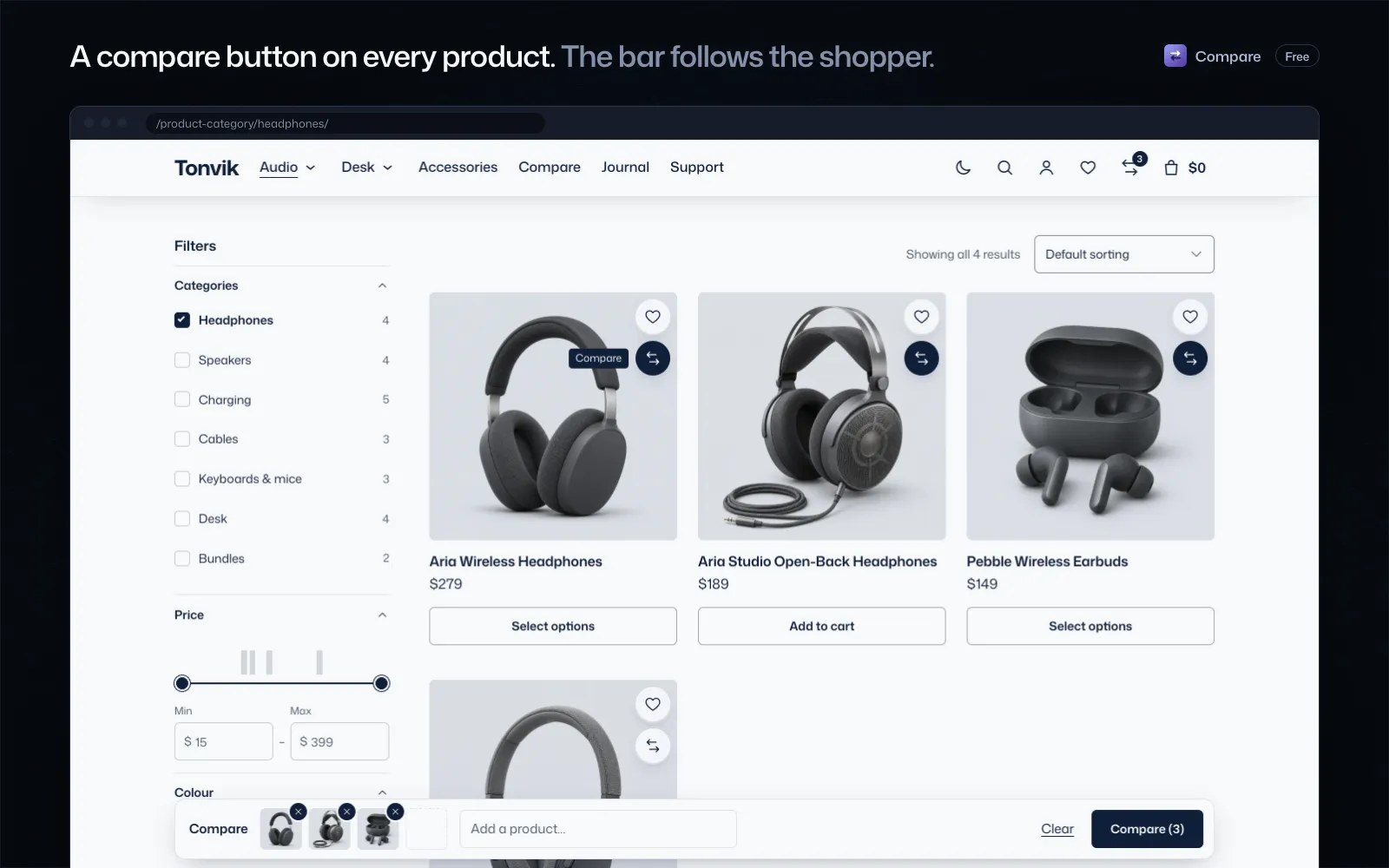

Shoppers who can’t decide leave to think about it. Put the products side by side instead.
XT Compare puts a compare button on every product, a bar that collects them as the shopper browses, and a table that highlights where the products differ and marks the lowest price and the top rating. It works the moment it’s active: the buttons appear, the Compare page is created for you, and the comparison opens in a sheet over the page, so shoppers keep their place and their filters.
A complete compare plugin, in the free version.





A compare button on every product
On block grids, classic shop pages and the product page. A tap adds the product, a sticky bar collects it, and a second tap takes it out again.

Search to add
Shoppers type a product name in the compare bar and add it without leaving the page.
Best-value badges
The lowest price and the top rating get a badge in the table.
Set it up with a live preview
Change the button, the bar or the rows and watch your own store update before you save.
See what shoppers compare
Insights: products added per day and the most-compared products.
A table that answers “which one?”
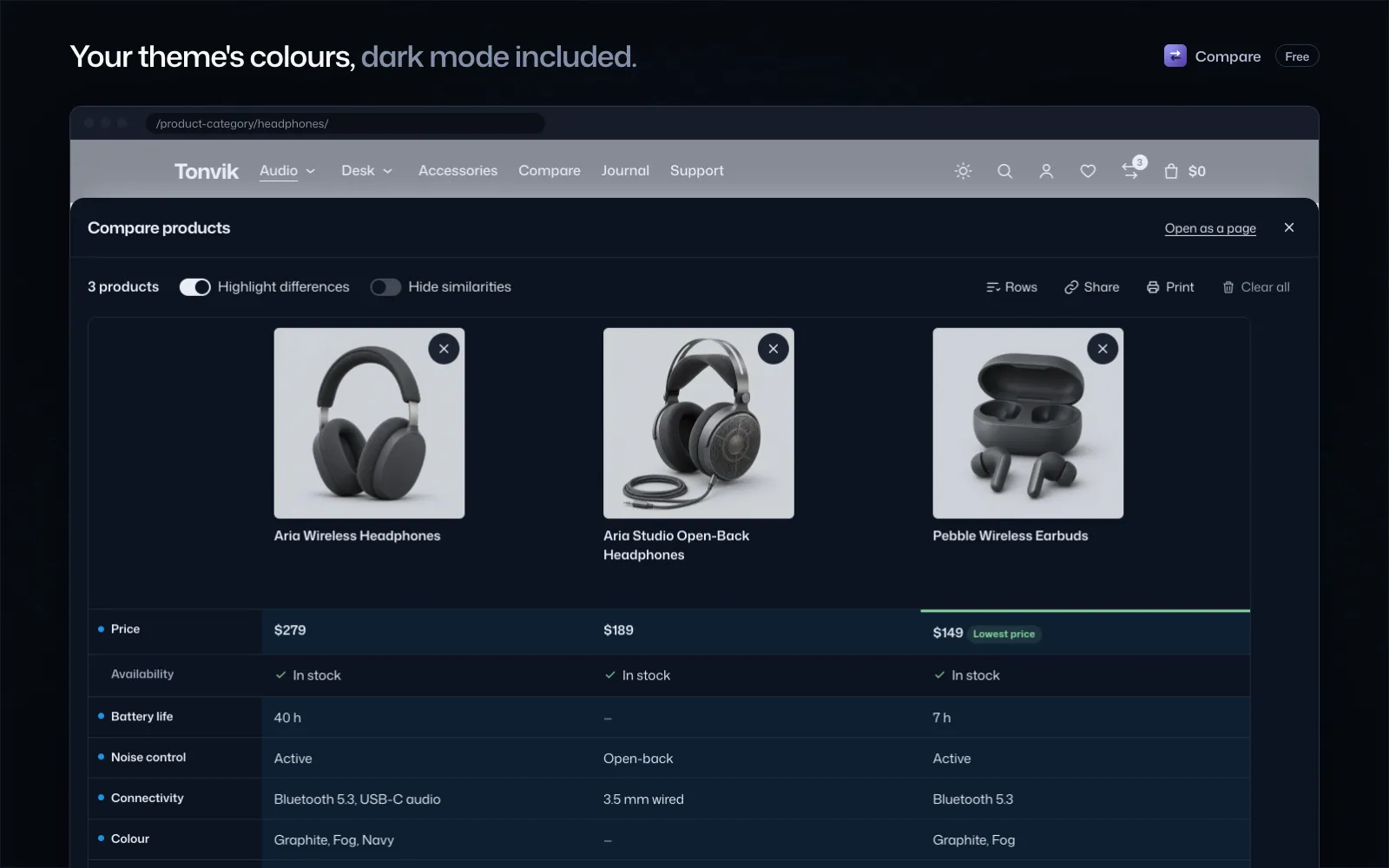
Highlight differences marks the rows where the products differ. Hide similarities folds the identical rows into one line, or hides them. The lowest price and the top rating carry a badge, so shoppers see what sets the products apart.
- Rows for price, rating, availability, every attribute, weight, dimensions and Add to cart
- A Rows menu so shoppers hide what they don’t need
- Names and row labels stay in view while scrolling
- Two products at a time on phones, with arrows and dots
Your theme’s colours, dark mode included.
XT Compare takes its colours, spacing and fonts from your theme, so the comparison follows your palette on block and classic themes, and switches with a dark mode.
- Icon, icon and text, checkbox or text link, five icons or your own SVG
- Bar at the top or bottom, to one side, or as a side panel
- Show it only on the categories, prices, stock or customer roles you choose
- Comparison Table block, shortcodes and a sidebar widget
Free is a complete compare plugin. Pro turns comparisons into content and sales.
Free
Everything a store needs to let shoppers compare products.
- A compare button on block grids, classic shop pages and the product page
- Icon, icon and text, checkbox or text link, five icons or your own SVG
- Show it only on the categories, prices, stock or customer roles you choose
- Compare 2 to 6 products, with a choice when the comparison is full
- A sticky compare bar with search to add and a category filter
- Bar at the top or bottom, to one side, or as a side panel
- Opens in a slide-up sheet, on the Compare page or in a new tab
- A row builder that suggests the attributes your products differ on
- Highlight differences and Hide similarities
- Lowest price and Top rated badges
- A Rows menu for shoppers, and drag to reorder products
- Compare variations, with an option picker in each column
- Share by link, email, WhatsApp, Facebook, X or Pinterest, and print
- Two products at a time on phones
- Header counter, Comparison Table block, shortcodes and a sidebar widget
- One settings screen with a live preview of your store
- Insights: products added per day and the most-compared products
- Cache-safe, WCAG 2.2 AA, RTL, WPML and Polylang, personal data tools
Pro
Spec-rich tables, and comparisons that turn into content and sales.
Everything in Free, plus:
- Rows from custom fields, ACF, taxonomies, shipping class and product data, with units
- Rows from a shortcode or fixed text
- Attribute groups shoppers can fold, and best value on any row
- Rows chosen per category, category tabs and “Compare more in” links
- Quick compare on the product page, editable per product
- Pros, cons and notes per product, drafted with AI using your own key
- Saved comparisons in My Account
- Comparison pages with their own text and search settings
- Four table styles, colours, text size and sheet animations
- Related products under the table, your logo, branded print and PDF
- Frequent pairs, compare-to-cart rate and revenue from comparisons
- GA4 events and a reminder email with an optional single-use coupon
- XT Wishlist, Quick View, Floating Cart and Variation Swatches integration
- Request a quote, a Product Bundles row, Elementor and Bricks widgets
Pro: compare with similar, right on the product page.
Quick compare puts a “Compare with similar” table under the product, from the same category and the nearest price, and one button adds them all to the shopper’s comparison. Choose the products yourself on any product when you want to.
- Similar products, best sellers, upsells, cross-sells or what shoppers compare it with
- Pros, cons and notes per product
- Comparison pages such as “Aria vs Pebble” with their own search settings
- Frequent pairs, with “Create a comparison page”

Works with your other XT plugins, and the tools your store already runs.
- Wishlist The compare button sits under the heart on the product image. Pro adds hearts in the table and Save all to wishlist. See Wishlist
- Floating Cart The compare bar keeps clear of the cart. Pro opens the cart after adding from the table. See Floating Cart
- Quick View Open a product in a quick view from its column Pro. See Quick View
- Variation Swatches Swatches in the table's option picker Pro. See Variation Swatches




- Page builders
- Block editor; Elementor and Bricks widgets (Pro)
- Languages
- WPML Polylang RTL
- Custom fields (Pro)
- ACF taxonomies such as brand product data
- Analytics (Pro)
- GA4 events for comparisons
Nine screens, on a real store.
-
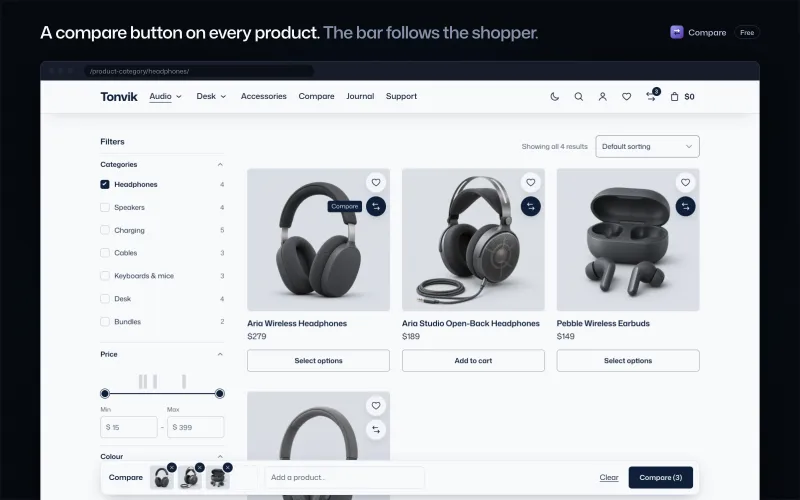
1A compare button on every product card, a header counter, and a compare bar with thumbnails, search to add and Compare (3). -
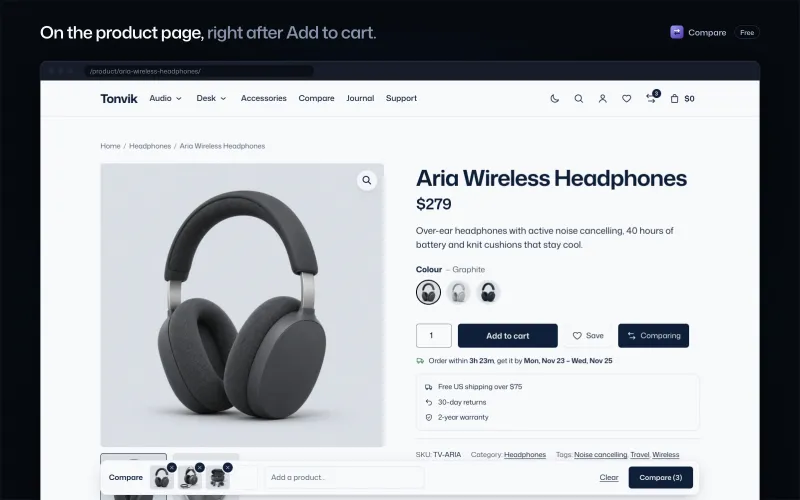
2On the product page the button sits after Add to cart and reads Comparing once the product is in the comparison. -
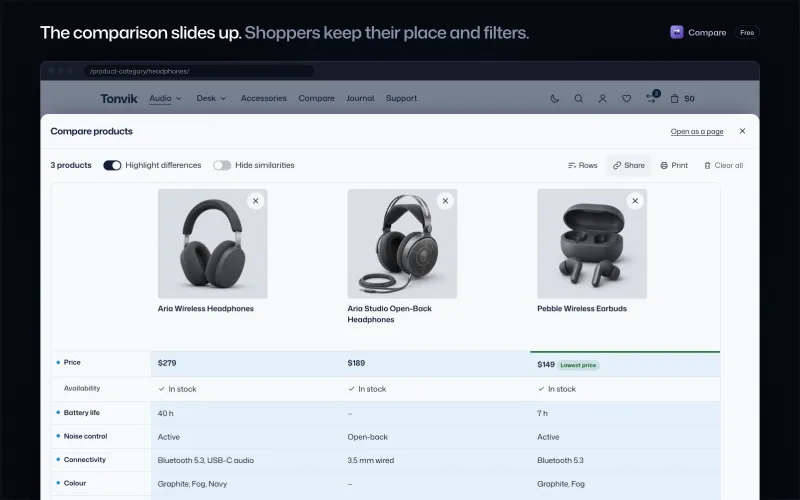
3The comparison slides up over the page, with differences highlighted and a Lowest price badge. -
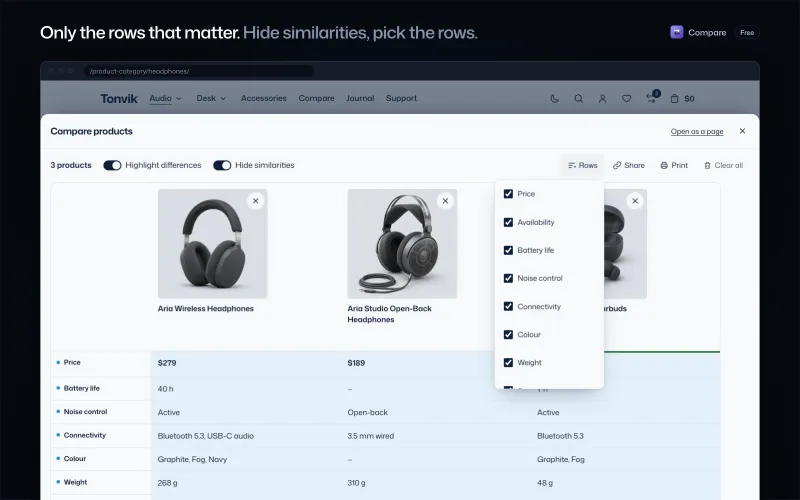
4Hide similarities drops the rows that are the same for every product, and the Rows menu lets shoppers choose what to see. -
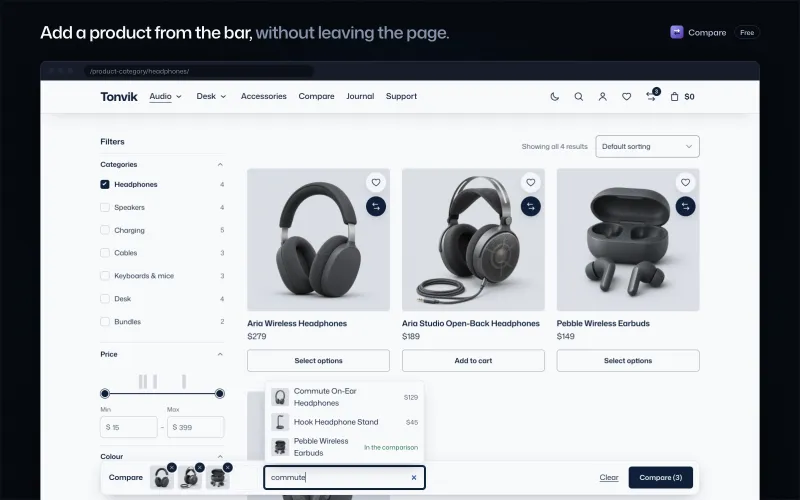
5Search to add: type in the compare bar and pick a product with the mouse or the arrow keys. -
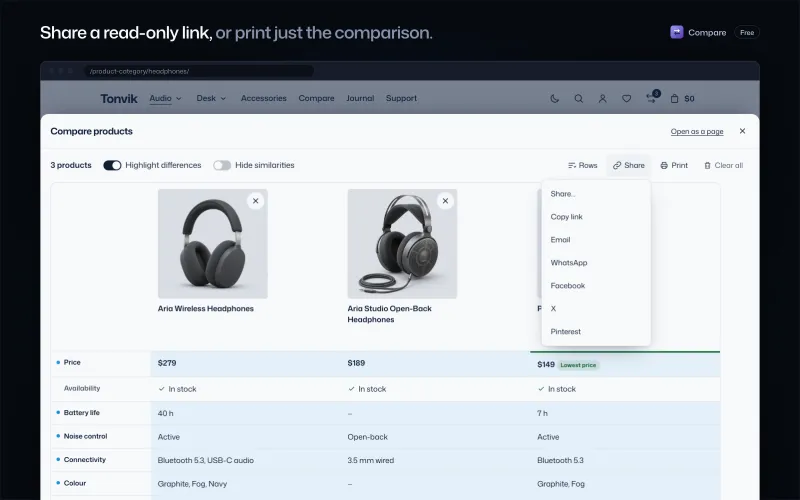
6Share a read-only link by email, WhatsApp, Facebook, X or Pinterest, or print the comparison on its own. -
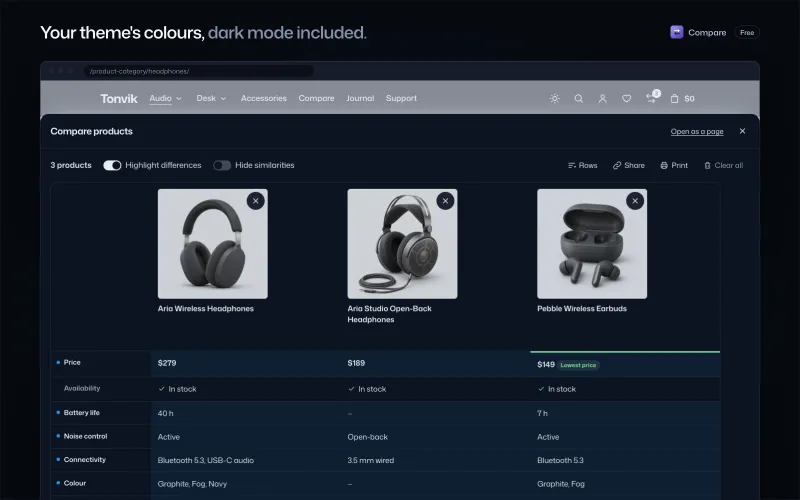
7Colours come from your theme’s palette, so the comparison follows a dark theme or a dark-mode switch. -
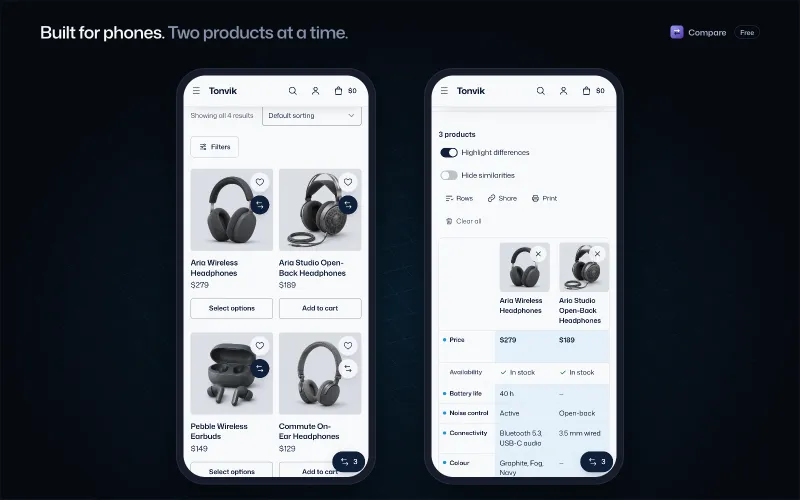
8On phones the bar shrinks to a pill while scrolling, and the table shows two products at a time beside the labels. -
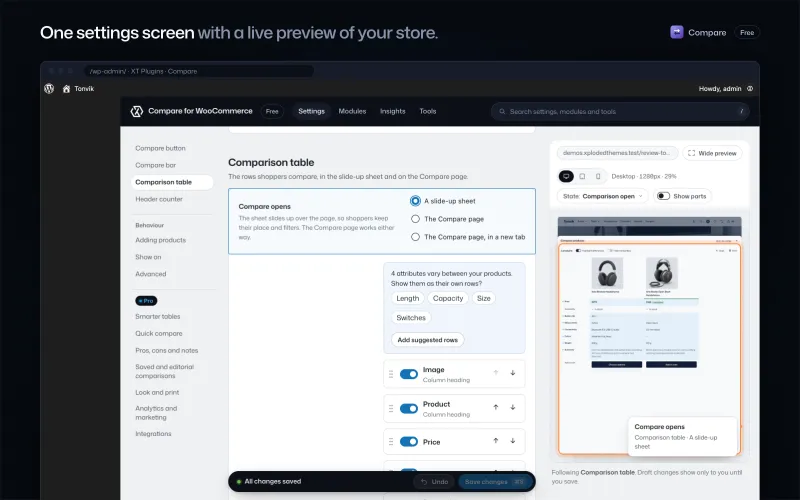
9One settings screen with a row builder that suggests the attributes your products differ on, and a live preview of your own store.
Questions
Something not covered here? Ask the team that builds it; pre-sale questions are welcome.
Ask a questionDoes it work with page caching?
Yes. Pages never contain the shopper’s comparison: the browser reads it after the page loads, and the Compare page is never cached.
Where does the comparison open?
In a sheet that slides up over the current page, so shoppers keep their place. You can send them to the Compare page instead, in the same tab or a new one.
How do I change the rows?
In XT Plugins > Compare > Comparison table. Drag, switch off and rename rows, and add the attributes it suggests. The preview shows the result with your own products.
Can I put a comparison in a blog post?
Yes. Add the Comparison Table block and pick the products, or use the [xt_compare] shortcode with product IDs or a category.
Does it work with variable products?
Yes. Turn on variation comparison: the product page adds the chosen variation, each column can switch to another option, and Add to cart in the table asks for options when it needs them.
Will it match my theme?
It takes its colours, spacing and fonts from your theme, so it follows your palette and dark mode on block and classic themes. Button and bar colours are in the settings.
What does Pro add?
Custom field rows, attribute groups, quick compare, pros and cons, saved and editorial comparisons, table styles, branded PDF, frequent pairs, revenue reports, a reminder email and integrations. The free version is complete without it.
Kept current, release after release.
Every number here is read live from the release feed, so this sheet is never older than the plugin.
- Tested up to
- WordPress 7.1
- Requires
- WordPress 6.6+
- PHP
- 7.4+
- First released
- Nov 2026
Pick a license. Change it any time.
Every Pro plan starts with a free trial, and every purchase has a 30-day money-back guarantee.
Free
$0on WordPress.org soon
Everything a store needs to let shoppers compare products.
- A compare button on every product
- Sticky compare bar with search to add
- Highlight differences and Hide similarities
- Lowest price and Top rated badges
Coming soon to WordPress.org. It’s in review now.
Pro
Spec-rich tables, and comparisons that turn into content and sales.
Black Friday + Cyber Monday Sale 40% off every license until December 1, applied at checkout.
Save 45% vs. monthly
Updates and support while your subscription is active.
A year of updates and support. If you don’t renew, the plugin keeps working; you just stop receiving updates and support.
Need more than Compare? Get it in a bundle.
Every bundle includes Compare Pro. One license covers every plugin in it, on the same number of sites.

Growth
11 plugins
Ten plugins for a store that is growing its catalogue, plus Starter Sites.






Regular price $25Sale price $15/month
10 more plugins for $9.60 a month more than Compare Pro alone.
Billed monthly.
Regular price $179Sale price $107.40/year
10 more plugins for $72 a year more than Compare Pro alone.
Save 40% vs. monthly. Billed yearly.

All Access
All 15 plugins, and every new one
Every XT plugin, and every plugin we release while you are a member.




Regular price $35Sale price $21/month
14 more plugins for $15.60 a month more than Compare Pro alone.
Billed monthly.
Regular price $249Sale price $149.40/year
14 more plugins for $114 a year more than Compare Pro alone.
Save 40% vs. monthly. Billed yearly.
Put them side by side. Let the table answer which one.
Questions before you buy? Ask the team that builds it.