

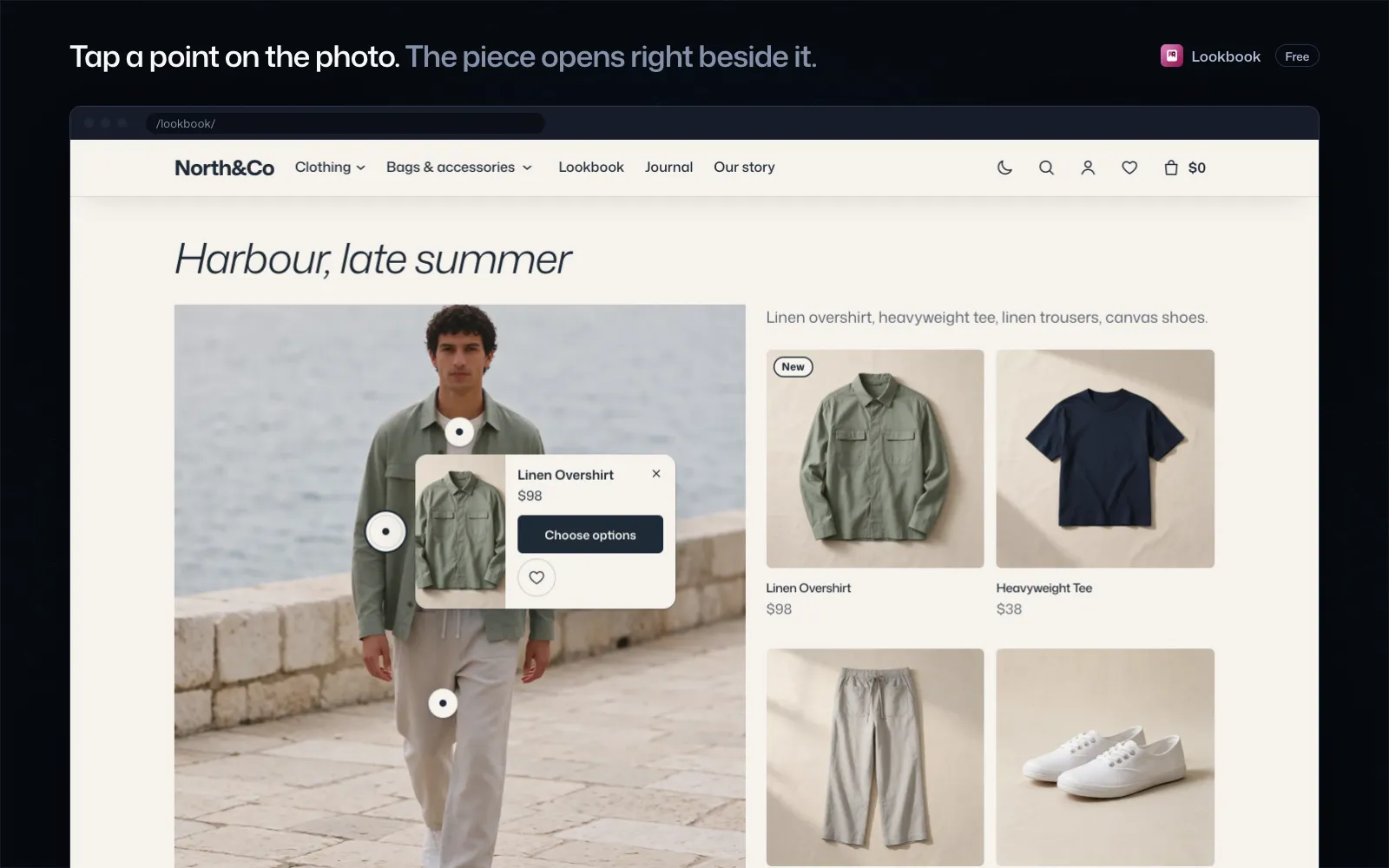

Your photos already show the products. Now shoppers can buy them there.
Add the Lookbook block, choose a photo, click where a product appears and pick the product. Shoppers tap the hotspot, see the piece with its price, and add it to the cart without leaving the page. The free version has no caps on hotspots or slides.
Shoppable photos, in the free version.



Shop from the photo
Each hotspot opens a card beside it with the photo, the price and Add to cart, which adds without a page reload.

Markers in your theme’s colours
Dot, plus or number, with a soft pulse that stops for shoppers who prefer reduced motion.


A bottom sheet on phones
Every marker keeps a 44 px tap area, and the card opens within reach of the thumb.



Build the look in the block editor
Click the photo to add a hotspot, search for the product right there, and see the shopper’s card as you edit.


See which looks work
Insights: looks seen, hotspots opened, products added to the cart and the most-opened products, with CSV export.
The photo beside its product list.
The split layout puts the look’s products next to the photo under “In this look”, each with Add to cart. Open a marker and its row lights up; point at a row and its marker answers.
- Hero, split and carousel layouts, plus a slider
- Open the first card on view, each card in turn, or show every price
- Product, Category and Note hotspots, or one pinned to a variation
- Sold-out products say “Sold out” or hide, as you choose

Every look on the store, in one place.
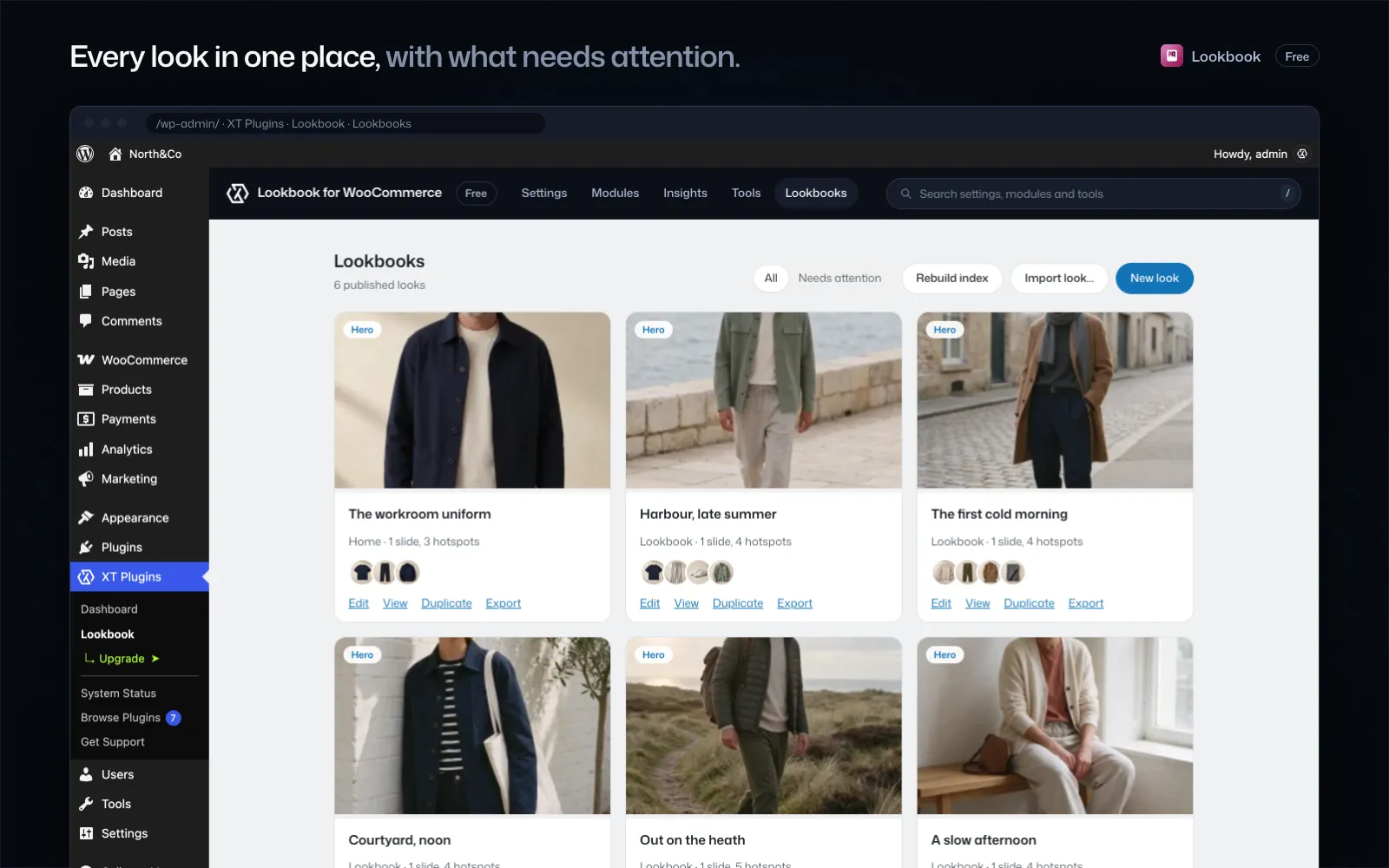
The Lookbooks screen lists each look with its photo, the page it lives on and its products, and flags what needs attention: hotspots without a product, sold-out or missing products. Duplicate, export and import looks from there.
- Phone positions, with hotspots the portrait crop hides flagged
- Look export and import, products matched by SKU
- Elementor widget, Bricks element and shortcode
- WPML and Polylang, currency switchers and RTL
Free sells from your photos. Pro sells the whole look.
Free
Everything a store needs to sell from its photos.
- The Lookbook block with unlimited hotspots and slides
- Click to add, drag to place, snapping guides and keyboard control
- Product, Category and Note hotspots, and hotspots pinned to one variation
- Separate hotspot positions for phones
- A live preview of the shopper’s card while you edit
- Product card with photo, price and Add to cart without a page reload
- Bottom sheet on phones and a 44 px tap area on every marker
- Hero, split (photo and product list) and carousel layouts, plus a slider
- Dot, plus and number markers with a soft pulse
- Open modes: first card on view, each card in turn, or every price shown
- XT Wishlist, XT Quick View and XT Floating Cart in the card
- Look export and import, matched by SKU
- The Lookbooks screen with warnings for hotspots that need attention
- Insights: looks seen, hotspots opened, products added, with CSV export
- Elementor widget, Bricks element and shortcode
- WPML and Polylang, currency switchers, RTL, Schema.org ItemList, privacy tools
Pro
Sell the whole look, and see what each look earns.
Everything in Free, plus:
- Shop the whole look: every product with its options, then one Add to cart
- An optional bundle discount for buying the full look
- Swatches, quantity, stock, sale and countdown badges in the card
- Several products on one hotspot, as a list or mini carousel
- Complete the look on product pages
- A look library with a reusable Look block and a shoppable gallery wall
- Video slides (your files, YouTube or Vimeo) and Instagram import
- Full-screen photo with pinch to zoom on phones
- Scroll story, before and after, and split-screen layouts
- AI product tagging and alt text with your own API key
- Analytics per look and per hotspot, with revenue and GA4 events
- Marker icons, your own SVG or image markers, labels and per-hotspot colours
- Editorial and detailed card layouts, and slides scheduled between dates
Pro: shop the whole look.
One button lists every product in the look with its options, then adds them all to the cart. An optional bundle discount (“Buy the look, save 10%”) applies in the cart while the whole look is there.
- Options per item, with XT Variation Swatches’ colours and images
- Complete the look on product pages
- Revenue per look: views, opens, adds to cart and orders
- AI product tagging suggests hotspots for you to confirm
Works with your other XT plugins, and the tools your store already runs.
- Wishlist XT Wishlist’s heart in the product card. See Wishlist
- Quick View “Choose options” opens XT Quick View for products with options. See Quick View
- Floating Cart XT Floating Cart opens after Add to cart. See Floating Cart
- Variation Swatches Its colours and images in the card’s swatches Pro. See Variation Swatches




- Page builders
- Block editor Elementor Bricks the [xt_lookbook] shortcode
- Languages and currencies
- WPML Polylang currency switchers
- Privacy
- WP Consent API WordPress privacy tools
- Analytics (Pro)
- GA4 events for every look
Eight screens, on a real store.
-
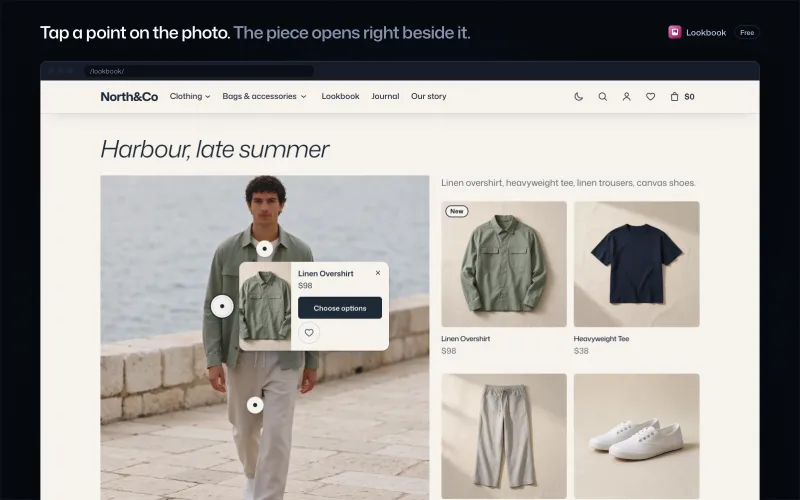
1A look in the split layout: dot markers on the photo, the product card next to the open one, and the look’s products beside it. -
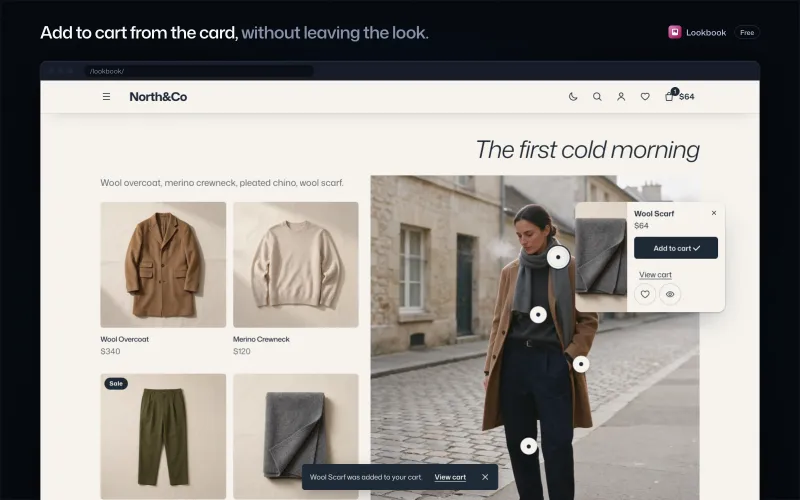
2Add to cart from the card without a page reload, with a short message, View cart, and the cart count updated. -
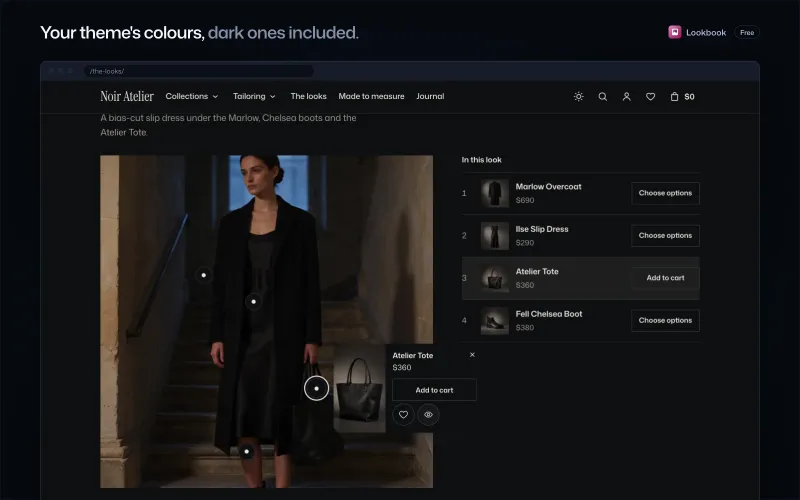
3On a dark theme the markers, card and “In this look” list take the theme’s colours, and the list row lights up with its hotspot. -
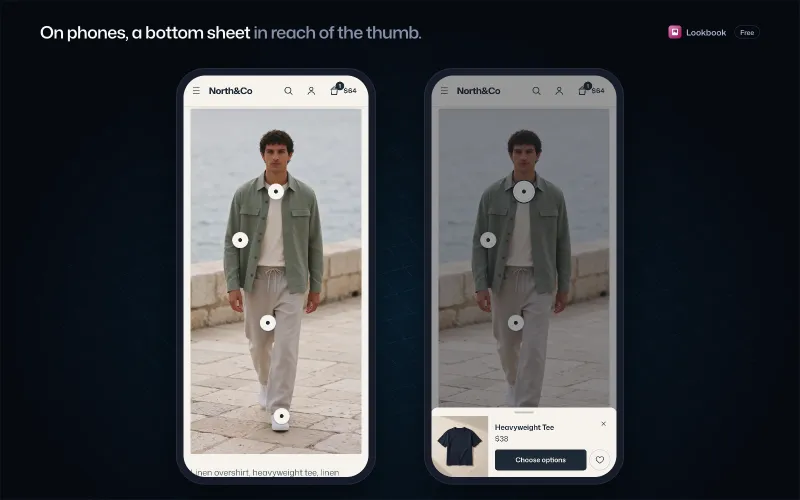
4On phones the markers keep a 44 px tap area and the card opens as a bottom sheet. -
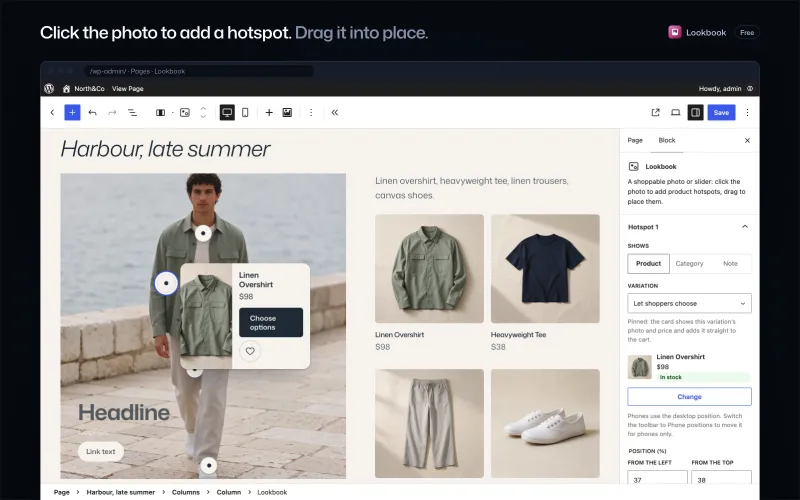
5In the block editor: click the photo to add a hotspot, drag it into place, pick the product, and see the shopper’s card as you edit. -
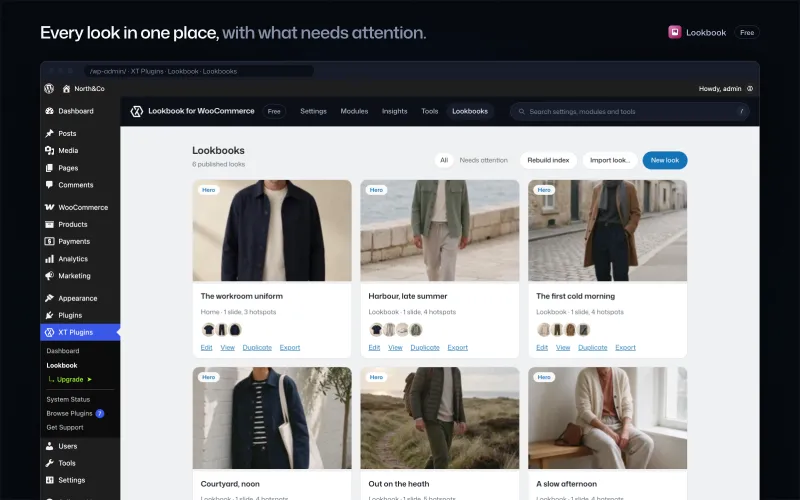
6The Lookbooks screen: every look on the store with its photo, page, products and anything that needs attention. -
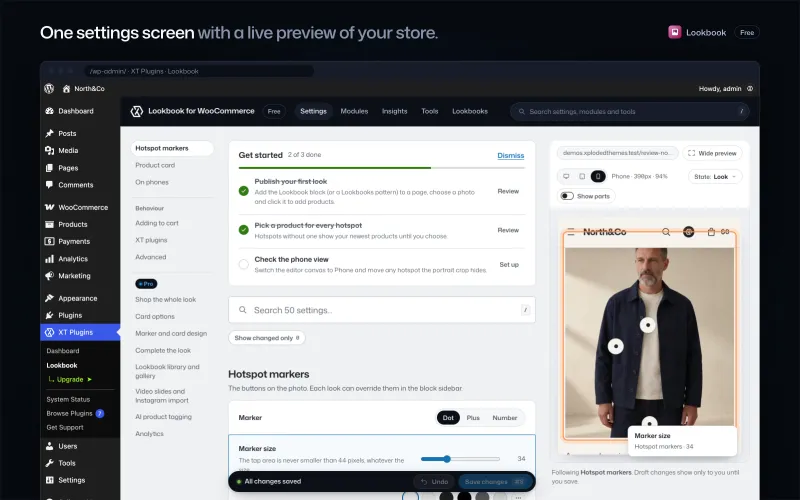
7One settings screen with a setup checklist, search and a live preview of your own store, on a computer or a phone. -
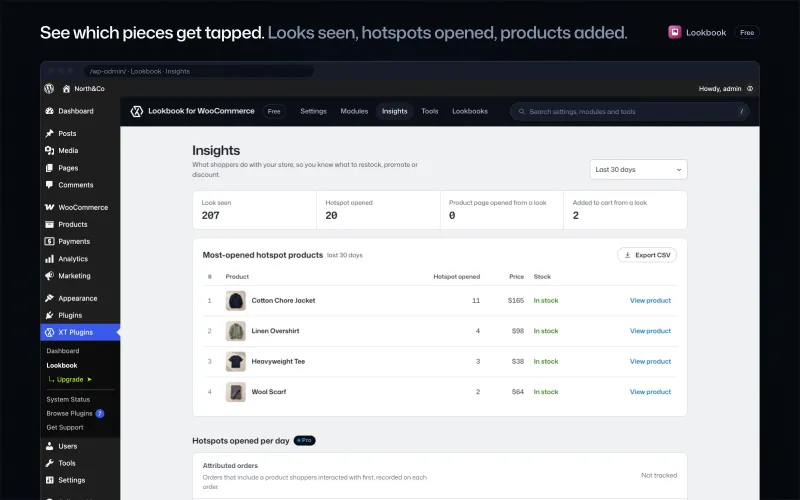
8Insights: looks seen, hotspots opened, product pages opened and products added to the cart, with the most-opened products.
Questions
Something not covered here? Ask the team that builds it; pre-sale questions are welcome.
Ask a questionDoes it work with my theme?
Yes. The block takes your theme’s colours and fonts, so it fits block themes and classic themes, dark mode included. To change the card’s markup, copy templates/card.php into your theme’s xt-lookbook folder.
Can I use it with Elementor or Bricks?
Yes. The Elementor widget and the Bricks element place any look you built, and the [xt_lookbook] shortcode works anywhere else.
A hotspot shows a product I didn’t pick.
Hotspots without a product show your newest products, so a fresh pattern is shoppable at once. Pick a product for each hotspot, or switch off “Fill hotspots without a product”. The Lookbooks screen lists every hotspot that still needs one.
Is it accessible?
Hotspots are buttons with names, cards are labelled dialogs that close with Escape, everything works with the keyboard, focus is always visible, and motion stops for shoppers who ask for reduced motion. It aims at WCAG 2.2 AA.
Does it slow my store down?
Nothing loads on pages without a look. On a page with one, the plugin adds about 7 KB (gzipped) and no jQuery.
What happens to looks I made with version 1.0?
They keep rendering as before. In the block sidebar, “Keep hotspots on the photo at every screen size” pins their hotspots to the photo.
What does Pro add?
Shop the whole look with an optional bundle discount, options in the card, Complete the look on product pages, a look library and gallery, video and Instagram looks, more layouts, AI product tagging and revenue analytics. The free version is complete without it.
Kept current, release after release.
Every number here is read live from the release feed, so this sheet is never older than the plugin.
- Tested up to
- WordPress 7.1
- Requires
- WordPress 6.6+
- PHP
- 7.4+
- First released
- Nov 2026
Pick a license. Change it any time.
Every purchase has a 30-day money-back guarantee.
Free
$0on WordPress.org soon
Everything a store needs to sell from its photos.
- Unlimited hotspots and slides
- A product card with Add to cart
- Phone positions and a bottom sheet
- Lookbooks screen and Insights
Coming soon to WordPress.org. It’s in review now.
Pro
Sell the whole look, and see what each look earns.
Black Friday + Cyber Monday Sale 40% off every license until December 1, applied at checkout.
Save 45% vs. monthly
Updates and support while your subscription is active.
A year of updates and support. If you don’t renew, the plugin keeps working; you just stop receiving updates and support.
Need more than Lookbook? Get it in a bundle.
Every bundle includes Lookbook Pro. One license covers every plugin in it, on the same number of sites.

All Access
All 15 plugins, and every new one
Every XT plugin, and every plugin we release while you are a member.










Regular price $35Sale price $21/month
14 more plugins for $15.60 a month more than Lookbook Pro alone.
Billed monthly.
Regular price $249Sale price $149.40/year
14 more plugins for $114 a year more than Lookbook Pro alone.
Save 40% vs. monthly. Billed yearly.
Your photos show the products. Let shoppers buy them there.
Questions before you buy? Ask the team that builds it.