

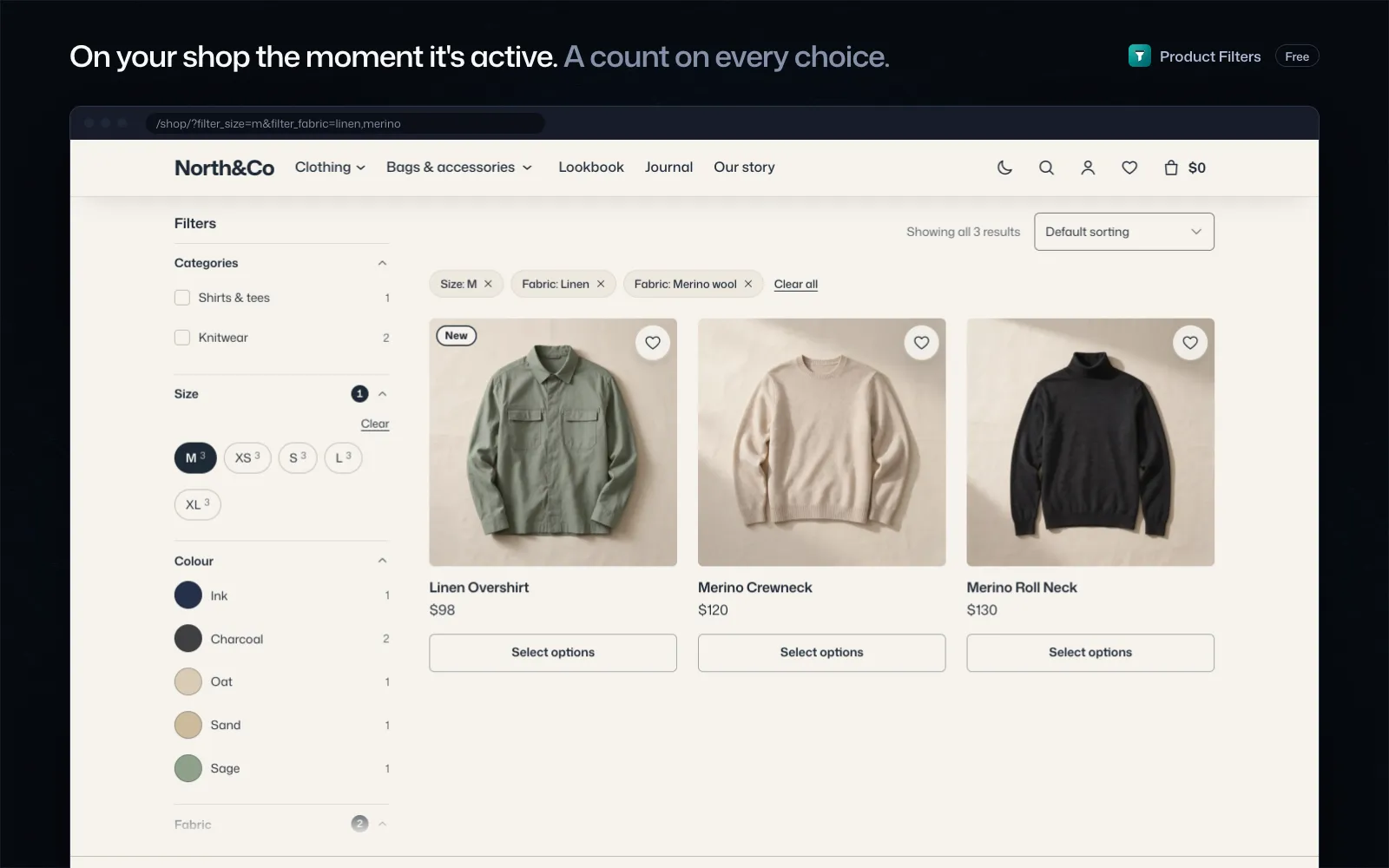

Shoppers find it faster. Every filter shows what it leaves.
XT Product Filters puts a count beside every choice, counted with the filters already picked, so a shopper can see a dead end before clicking into it. It works the moment it’s active: your shop and category pages get a sidebar with Categories, Price, every attribute, Availability and Rating, and phones get a drawer. No setup and no theme edits.
Complete product filters, in the free version.





A count on every choice
A sidebar on your shop the moment it’s active. Each choice shows how many products it leaves with the filters already picked, and results update without a page reload.
Price with a histogram
A slider with min and max fields over a histogram of where your prices sit, or preset ranges like “Under $50”.
Colour swatches you set
Your own colour or image for every term, a contrast ring for pale colours, and choices that would show nothing greyed out.

A drawer on phones
The “Show 128 products” button counts as shoppers pick, and the grid behind it waits until they confirm.
Set it up with a live preview
The Filter builder: pick the filters, their order, how each one shows and where each set appears, next to your own shop.
No dead ends.
When a combination still finds nothing, shoppers don’t get an empty page. They see which filter to remove and how many products that brings back, as in “Remove Size: XS to see 14 products”.
- Active filters as removable chips above the products, with Clear all
- Instant results, or an Apply button
- Every filter state is a URL shoppers can share, and back and forward work
- Without JavaScript the panel still works as a plain form
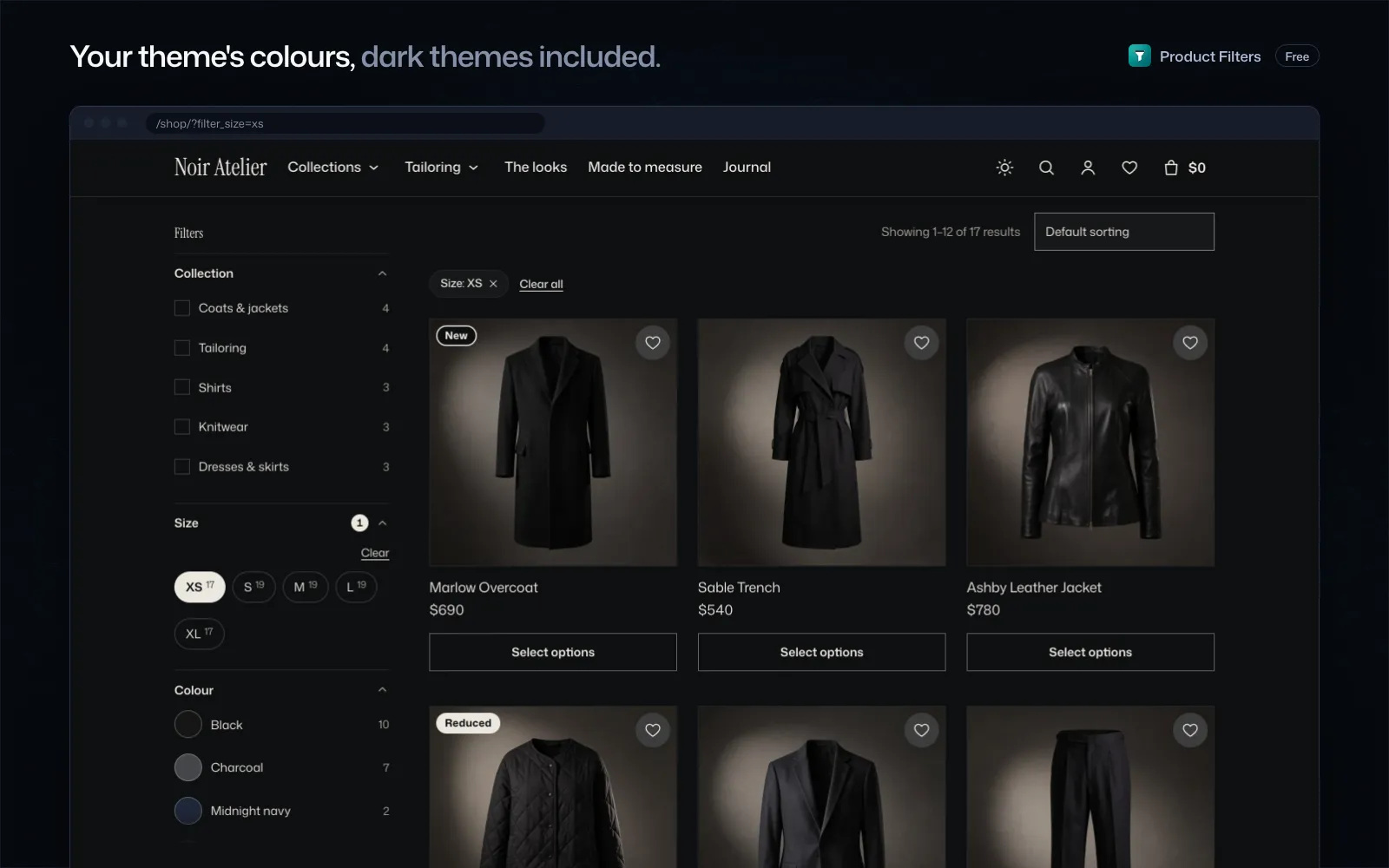
Your theme’s colours, dark mode included.
Colours, corners, fonts and spacing come from your theme, so the filters match your store and its dark mode. It loads under 10 KB on product listings and is built for keyboards, screen readers and 44 px tap targets on phones.
- A sidebar, a bar of dropdowns, or a Filters button with a drawer
- Checkboxes, radio, dropdown, multi-select, chips, swatches, images, stars and switches
- Filters for [products], Product Collection, Query Loop and builder grids
- Product Filters and Active Filters blocks, shortcode, widget and Elementor widget
Free is complete. Pro is for big catalogs.
Free
Everything a store needs to let shoppers narrow the catalog.
- A sidebar on your shop the moment it’s active, a drawer on phones
- A live count on every choice, with the filters already picked
- “Remove Size: XS to see 14 products” instead of an empty page
- Categories, tags, brands, attributes, other taxonomies, vendors and custom fields
- Price slider with a histogram, min and max fields or preset ranges
- Rating, availability, on sale, featured, sorting and search with SKUs
- Checkboxes, radio, dropdown, multi-select, chips, swatches, images, stars and switches
- Colour swatches with your own colours and images
- Sidebar, a bar of dropdowns, or a Filters button with a drawer
- Instant results or an Apply button, chips with Clear all, shareable URLs
- Unlimited filter sets with rules for where each one shows
- Filters for [products], Product Collection, Query Loop and builder grids
- Product Filters and Active Filters blocks, shortcode, widget and Elementor widget
- Filter builder and settings with a live preview of your store
- noindex and canonical on filter pages, nofollow links and a crawler guard
Pro
For big catalogs, variable products and filter pages that rank.
Everything in Free, plus:
- An index table for 20,000 to 100,000+ products, built in the background
- WP-CLI commands to build and check the index
- Variation-aware filtering, with the matching variation’s image, price and link
- Each matching variation as its own card
- Custom attributes, number ranges over custom fields, weight and dimensions
- Stock quantity, date added, product type and shipping class filters
- SEO landing pages: pretty URLs, a title, heading and intro per combination
- A bulk generator, sitemap and hreflang for those pages
- A bottom sheet and quick chips on phones
- Step-by-step filters and category dropdown chains
- Load more and infinite scroll that keep page URLs
- Filter analytics, sales after filtering and Google Analytics 4 events
- Pinned and boosted products, and a default order per category
- Divi, Bricks, Breakdance, Beaver Builder and Oxygen elements
- Two-colour swatches and tooltips
- Import, export and duplicate filter sets
- Updates and support from the team that builds it
Pro: the variation they picked.
A variable product matches only when one in-stock variation has every chosen attribute. Its card then shows that variation’s image and price and links to it, so a shopper who filtered for sage sees the sage one.
- Each matching variation as its own card, if you prefer
- An index table for 20,000 to 100,000+ products, kept fresh on every product save
- SEO landing pages with their own title, heading, intro and sitemap entry
- Filter analytics: the most used filters, combinations that find nothing, sales after filtering
Works with your other XT plugins, and the tools your store already runs.

- Page builders
- Block editor and Elementor; Divi Bricks Breakdance Beaver Builder and Oxygen elements (Pro)
- SEO plugins
- Yoast SEO Rank Math SEOPress All in One SEO
- Languages and currencies
- WPML Polylang TranslatePress WooCommerce Multilingual WooPayments
- Marketplaces and custom fields
- Dokan WCFM MultiVendorX WC Vendors ACF Meta Box
Seven screens, on a real store.
-
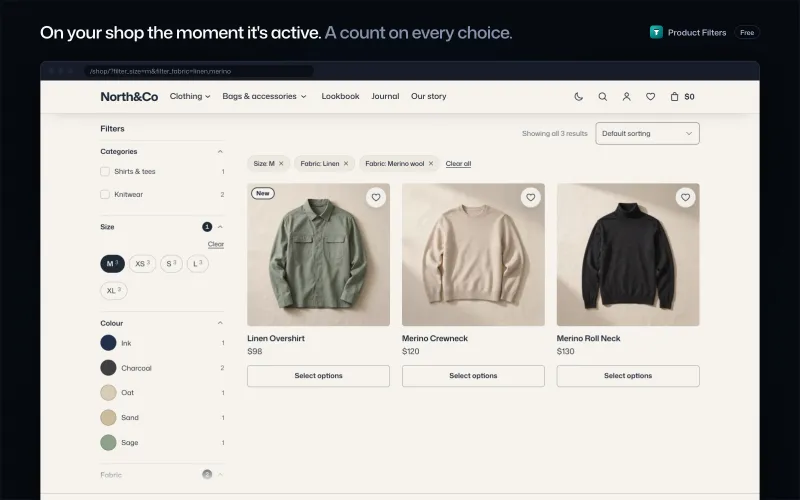
1The filter sidebar on the shop page: a count beside every choice, removable chips above the results and Clear all. -
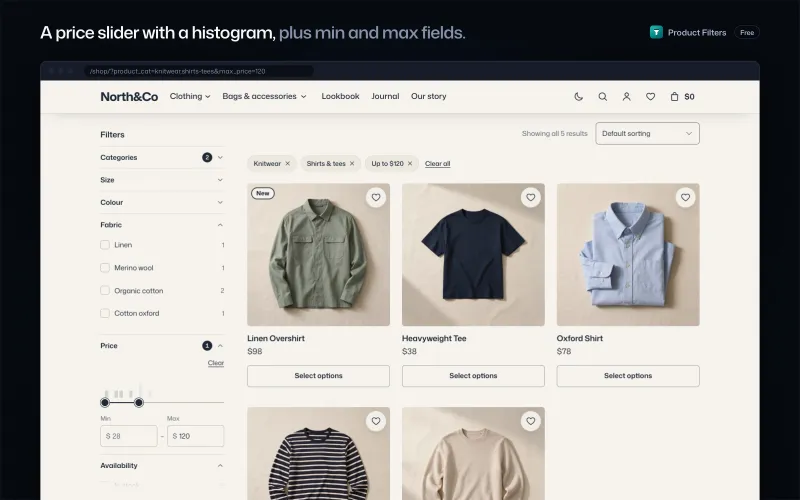
2Price as a slider with a histogram of where prices sit and min and max fields, next to collapsible groups. -
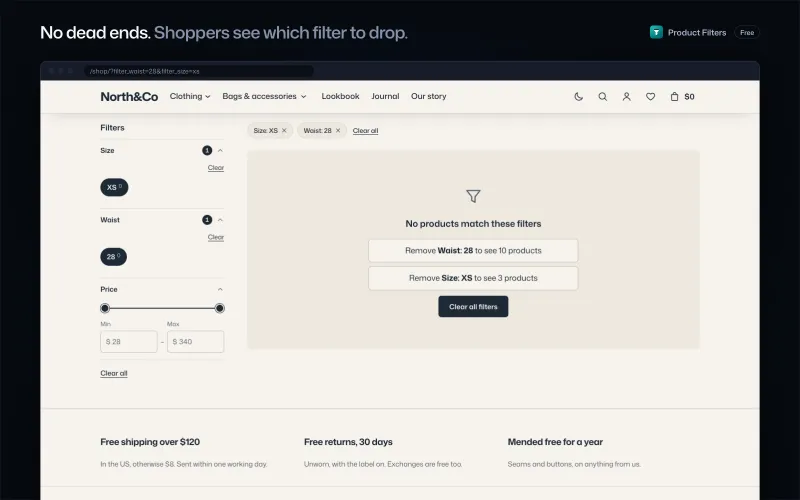
3When a combination finds nothing, shoppers see which filter to remove and how many products that brings back. -
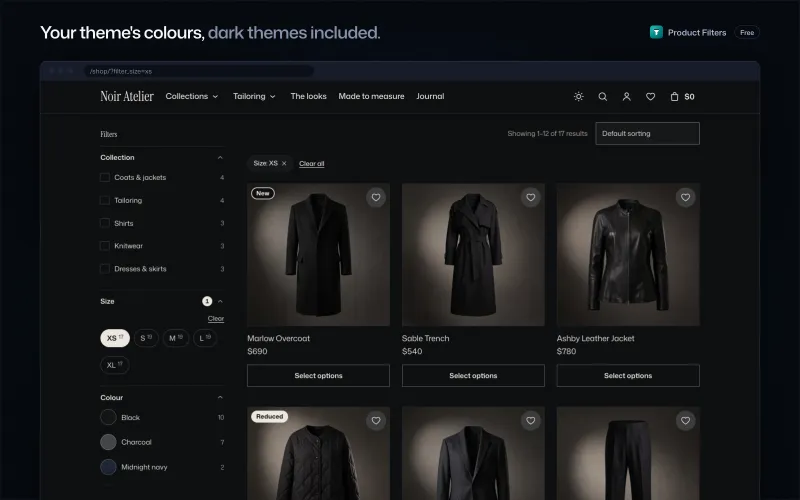
4Colours, corners and fonts come from your theme, so the filters match a dark theme as well as a light one. -
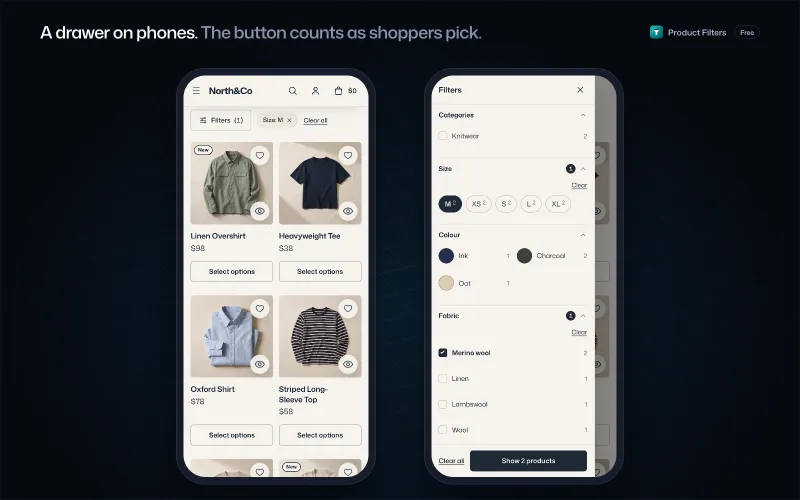
5On phones the filters open in a drawer, and the Show products button updates its count as shoppers pick. -
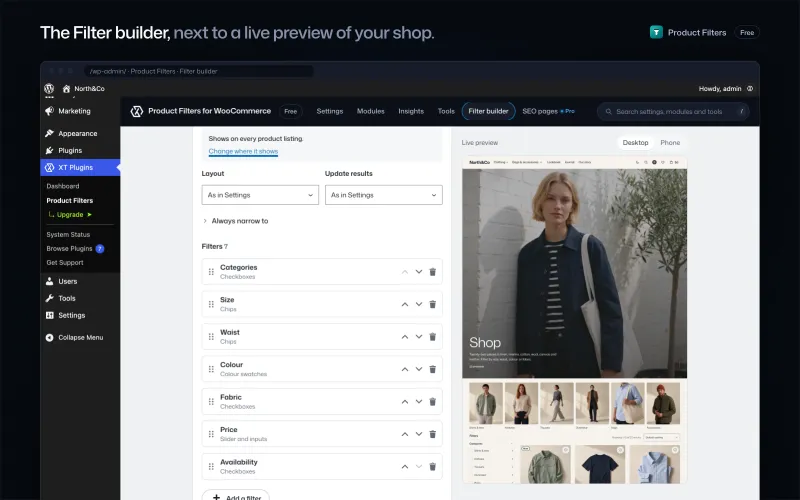
6The Filter builder: choose the filters, their order and where each set shows, next to a live preview of your shop. -
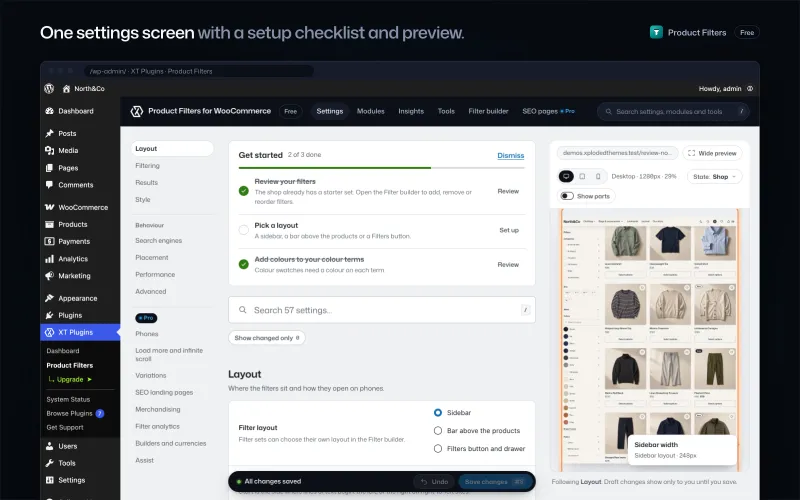
7One settings screen with search, a setup checklist and a live preview of your store on desktop, tablet or phone.
Questions
Something not covered here? Ask the team that builds it; pre-sale questions are welcome.
Ask a questionDo I have to set anything up?
No. Your shop and category pages get the filters as soon as it’s active, with nothing to configure and no theme edits. To choose filters, their order and where they show, open XT Plugins > Product Filters > Filter builder.
My theme already has a filter sidebar.
If your shop template contains WooCommerce’s Product Filters block, the automatic panel stays off so the two don’t clash. Remove that block, or place the Product Filters block where you want it. Settings > Placement turns the automatic panel off.
Does it work with the Product Collection block?
Yes. On block themes it wraps the main Product Collection block (or the Classic Template) in the same layout, and Product Collection blocks with their own query on other pages can be filtered too.
Will filtered pages be indexed?
Not by default. They send noindex, follow and a canonical link to the unfiltered page. A single category on its own page stays indexable. Pro’s SEO landing pages let you choose combinations that should rank.
How fast is it on a large catalog?
Counts come from a cached index, built per listing and refreshed when a product changes. That is enough up to about 10,000 products. Pro’s index table is built for larger catalogs.
Can I change the markup?
Yes. Copy option.php, group.php, active-filters.php or no-results.php from the plugin’s templates folder to yourtheme/xt-product-filters/.
What does Pro add?
An index table for big catalogs, more filter sources, variation-aware filtering, SEO landing pages, a phone bottom sheet, step-by-step filters, load more, filter analytics and merchandising. The free version is complete without it.
Kept current, release after release.
Every number here is read live from the release feed, so this sheet is never older than the plugin.
- Tested up to
- WordPress 7.1
- Requires
- WordPress 6.6+
- PHP
- 7.4+
- First released
- Nov 2026
Pick a license. Change it any time.
Every Pro plan starts with a free trial, and every purchase has a 30-day money-back guarantee.
Free
$0on WordPress.org soon
Everything a store needs to let shoppers narrow the catalog.
- A sidebar on your shop, a drawer on phones
- A live count on every choice
- Colour swatches and a price slider
- Filter builder with a live preview
Coming soon to WordPress.org. It’s in review now.
Pro
For big catalogs, variable products and filter pages that rank.
Black Friday + Cyber Monday Sale 40% off every license until December 1, applied at checkout.
Save 45% vs. monthly
Updates and support while your subscription is active.
A year of updates and support. If you don’t renew, the plugin keeps working; you just stop receiving updates and support.
Need more than Product Filters? Get it in a bundle.
Every bundle includes Product Filters Pro. One license covers every plugin in it, on the same number of sites.

Growth
11 plugins
Ten plugins for a store that is growing its catalogue, plus Starter Sites.









Regular price $25Sale price $15/month
10 more plugins for $9.60 a month more than Product Filters Pro alone.
Billed monthly.
Regular price $179Sale price $107.40/year
10 more plugins for $72 a year more than Product Filters Pro alone.
Save 40% vs. monthly. Billed yearly.

All Access
All 15 plugins, and every new one
Every XT plugin, and every plugin we release while you are a member.




Regular price $35Sale price $21/month
14 more plugins for $15.60 a month more than Product Filters Pro alone.
Billed monthly.
Regular price $249Sale price $149.40/year
14 more plugins for $114 a year more than Product Filters Pro alone.
Save 40% vs. monthly. Billed yearly.
Let shoppers narrow the catalog. Show them what each choice leaves.
Questions before you buy? Ask the team that builds it.