


Shoppers who search are ready to buy. Most don’t type the name exactly.
XT Live Search shows results as they type, finds “merino” when they write “merinno”, and says what it searched for. It works the moment it’s active: your theme’s search forms get live results with no setup, the plugin builds its own search index in the background, and there is no limit on how many products you have.
A complete search, in the free version.







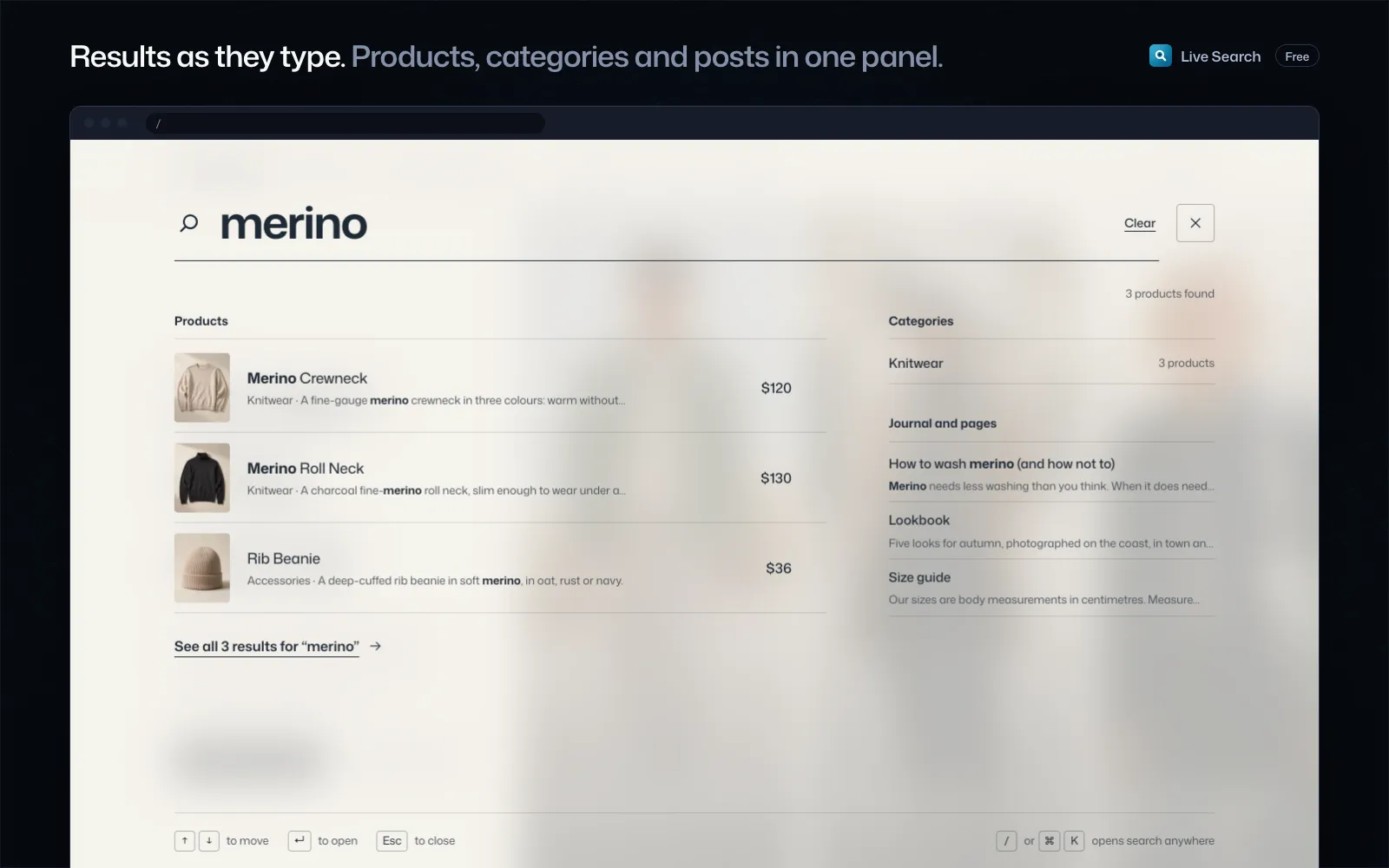
Results as they type
Products with image, price, rating and badges, then categories, pages and posts, with the searched words in bold. On wide screens the highlighted product shows beside the list.
Typos forgiven
“Merinno” still finds the merino crewneck, and the panel says what it searched for.
Never a dead end
Suggested and recent searches before the first letter. When nothing matches, suggestions and popular categories instead of an empty box.




Full-screen search on phones
Header search fields shrink to their icon. A tap opens a full-screen search with big touch targets, with See all always in reach.
Fix the searches that found nothing
Insights: top searches, click-through and searches that found nothing, for 7, 30 or 90 days. Add a synonym in one click.
See what shoppers get, and why.
Type any search in the Playground and see what shoppers get, in order, with why each result ranks there: the matched words, typos, synonyms, fields and bonuses.
- Typo tolerance off, normal or relaxed, scaled to the length of each word
- Plurals and word endings in seven languages
- Synonym groups, two-way or one-way, and your own stop words
- SKU, variation SKU, GTIN, attributes, brands and your own taxonomies searched
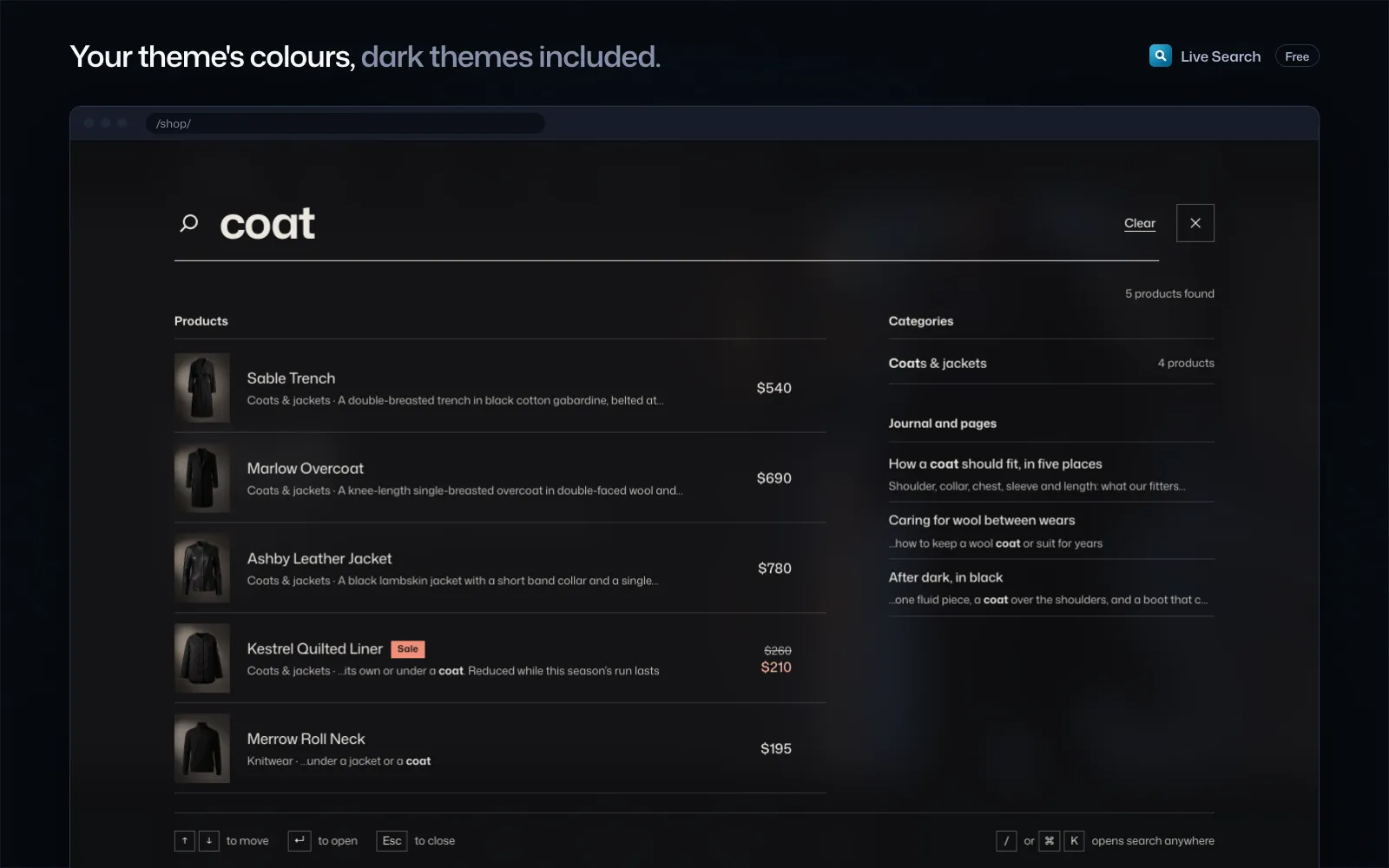
Your theme’s colours, dark mode included.
The panel takes its colours from your theme’s palette, so it follows your theme and its dark mode. Highlight, panel and text colours and your own CSS are in the settings, with a live preview of your own store.
- Search blocks, the WooCommerce product search and classic search forms
- Header searches in about 70 popular themes
- Live Search block, shortcode, widget and a search icon for menus
- About 3.6 KB on pages with a search form; the rest loads when someone searches
Free is a complete search. Pro steers it, and shows what it sells.
Free
A fast, forgiving product search for any WooCommerce store.
- Live results for your theme’s search forms, with no setup
- Header searches of about 70 popular themes, plus any standard search form
- Products with image, price, rating and badges; categories, brands, pages and posts
- Typo tolerance, plurals in seven languages, synonyms and stop words
- SKU, variation SKU, GTIN, attributes, brands and custom taxonomies searched
- A preview of the highlighted product on wide screens
- Suggested searches, recent searches and popular categories before typing
- No dead ends: corrections, partial matches and suggestions when nothing matches
- Full-screen search on phones, voice search and keyboard shortcuts
- The same order on the store’s search results page
- Members, B2B and wholesale visibility respected
- Live Search block, shortcode, widget, menu icon and six page-builder widgets
- One settings screen with a live preview, and the Playground
- Insights: top searches, searches with no results and click-through, with one-click synonyms
- No product limits, cache-safe, accessible, WPML, Polylang and TranslatePress
Pro
Steer what search shows, and see what it sells.
Everything in Free, plus:
- Pin, boost, bury or hide products for a search, with date windows
- Send a search straight to a page, and promo banners in the panel
- Field weights and boosts for best sellers, margin, stock, new arrivals and ratings
- “Red dress under 50” read as filters, shown as removable chips
- Meaning-based results, synonym suggestions and search by photo, with your own AI key
- Grid layout, add to cart with quantity and options, and filter chips in the panel
- Trending searches before typing and suggestions while typing
- Custom fields, custom attributes, any post type and vendor stores searched
- Carts, orders and revenue per search, trends and CSV export
- A weekly email of searches that found nothing
- Several search setups with their own sources and limits
- XT Product Filters and marketplace integrations
Pro: steer what search shows.
Searches like “red dress under 50” become filters, shown as removable chips, and shoppers add to cart with quantity and options right in the panel. Smart search uses your own OpenAI-compatible key or a model on your own server, never our servers, with no per-search fees.
- Pin, boost, bury or hide products for a search, with date windows
- Send a search straight to a page, and promo banners in the panel
- Boosts for best sellers, margin, stock, new arrivals and ratings
- Carts, orders and revenue per search, with a weekly email of searches that found nothing


Works with your other XT plugins, and the tools your store already runs.

- Themes
- Header searches in about 70 themes Astra Kadence Blocksy OceanWP GeneratePress Flatsome and Storefront among them
- Page builders
- Elementor Bricks Divi Breakdance Oxygen and Beaver Builder
- Languages and currencies
- WPML Polylang TranslatePress currency switchers and role prices
- Analytics
- GA4 search and select_item events
- Marketplaces (Pro)
- Dokan WCFM and MultiVendorX vendor stores
Nine screens, on a real store.
-
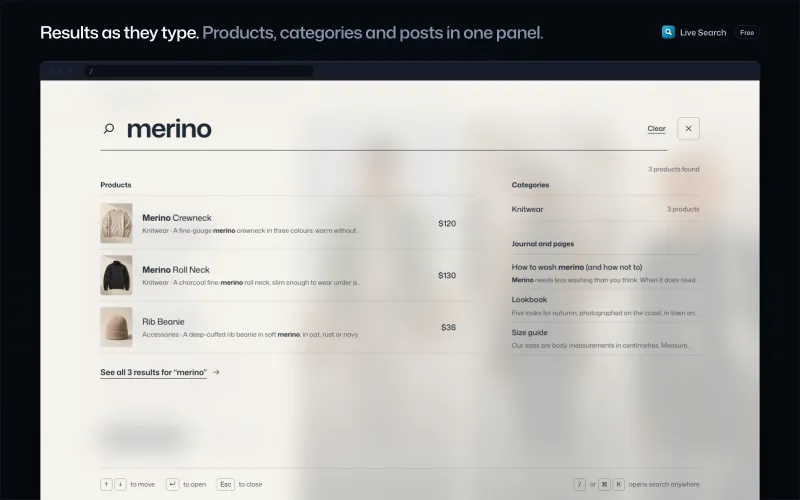
1Results as you type: products with image, price and badges, plus matching categories, journal posts and pages, with the searched words in bold. -
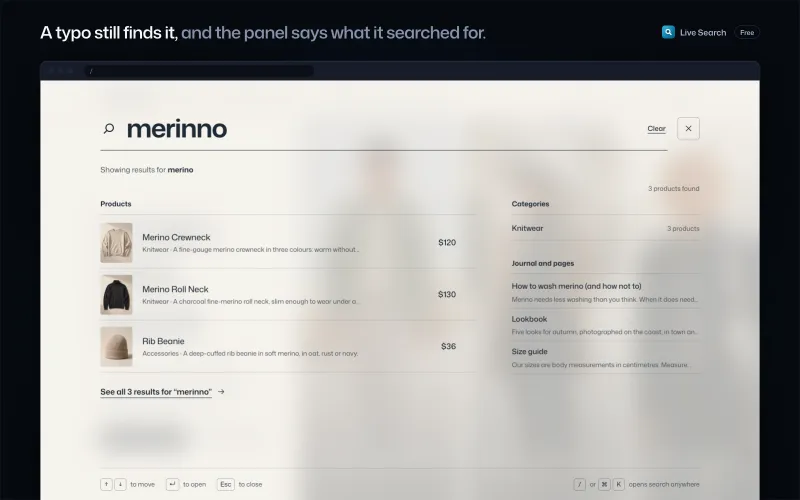
2Typo tolerance: “merinno” finds the merino products, and the panel shows “Showing results for merino”. -
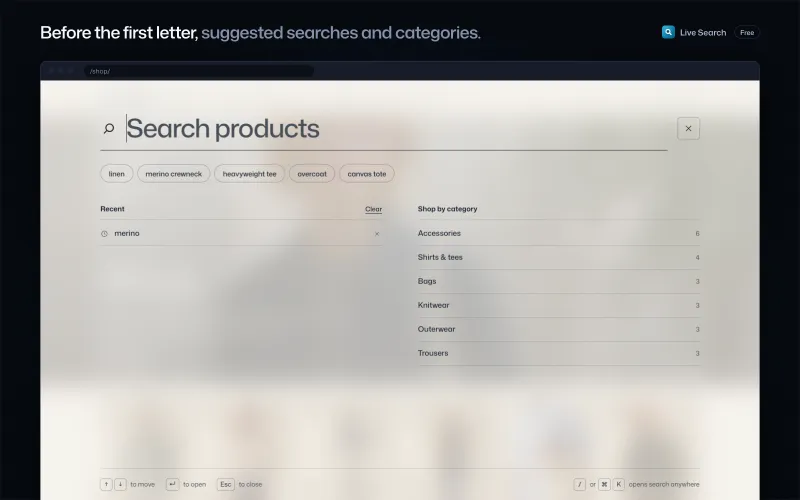
3Before typing: the searches you suggest, the shopper’s recent searches and your popular categories. -
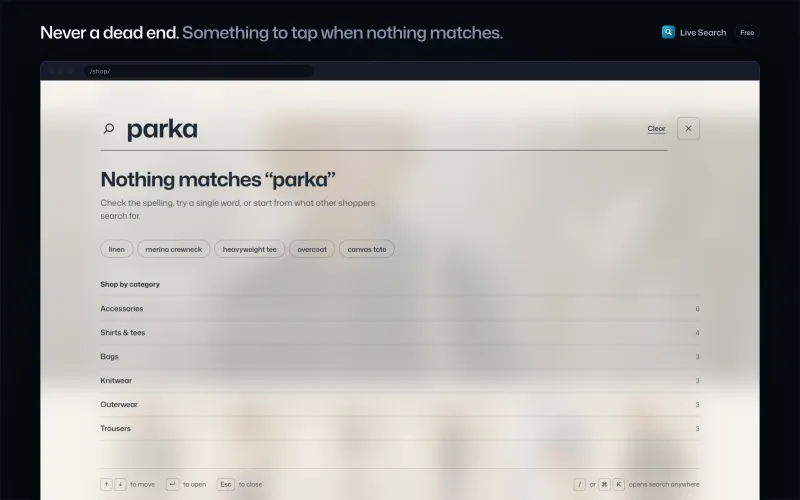
4When nothing matches, the panel offers your suggested searches and popular categories instead of an empty box. -
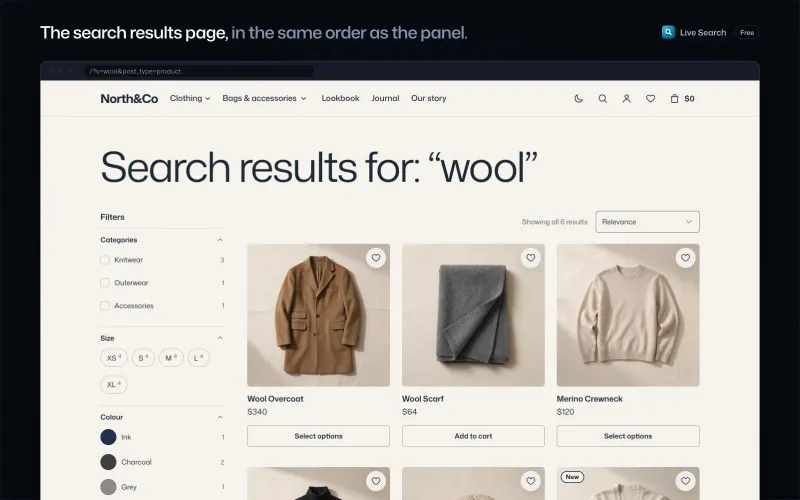
5The store’s search results page uses the same index and the same order, sorted by relevance. -
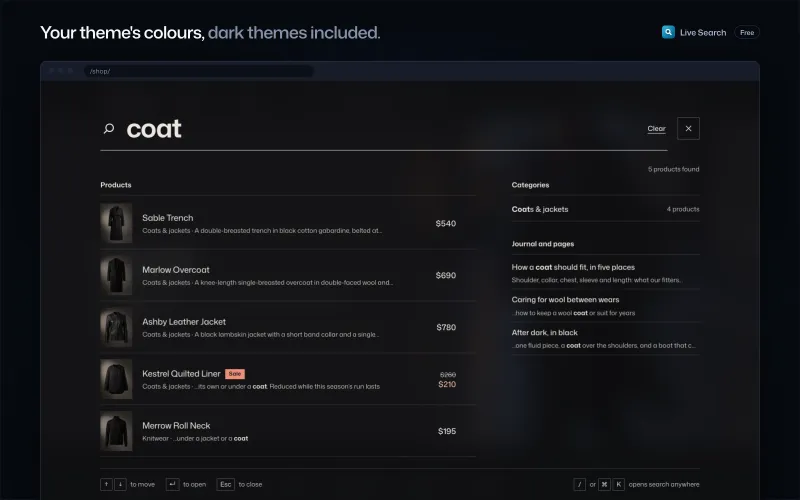
6The panel takes its colours from your theme’s palette, so it follows a dark theme too. -
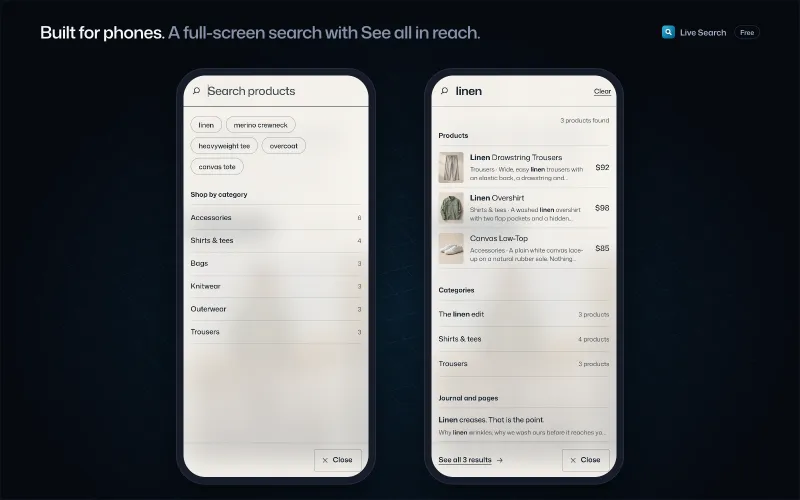
7On phones: a full-screen search with big touch targets, suggested and recent searches, and See all always in reach. -
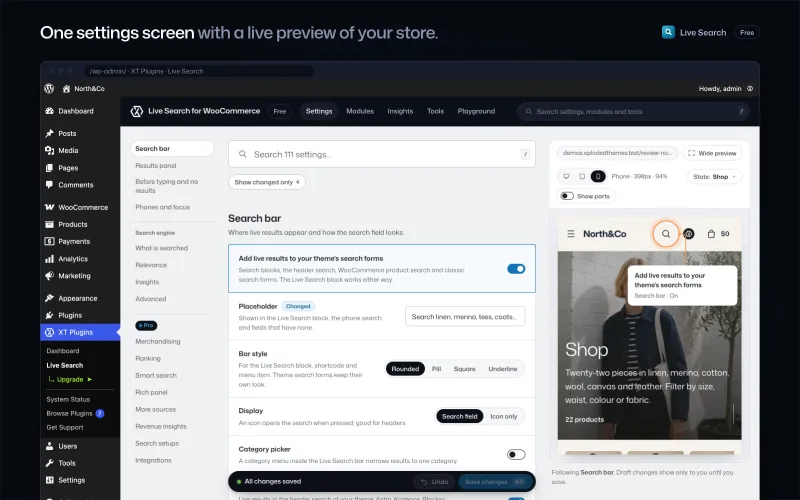
8One settings screen with search, a setup checklist and a live preview of your own store. -
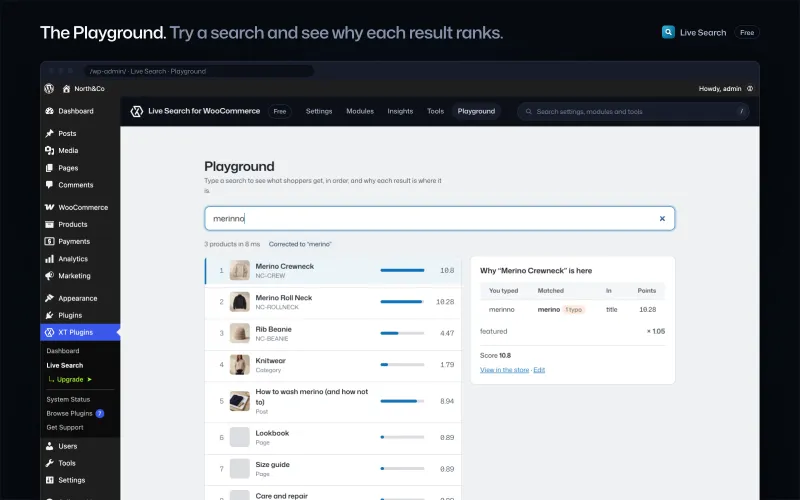
9The Playground: try any search, see what shoppers get, and why each product ranks where it does.
Questions
Something not covered here? Ask the team that builds it; pre-sale questions are welcome.
Ask a questionIs there a limit on products?
No. The search index has no product cap, and no plan is priced by catalogue size.
Does it work with my theme’s search?
Yes. Search blocks, the WooCommerce product search, standard search forms and the header searches of about 70 popular themes get live results automatically. You can add more forms by CSS selector under Advanced.
Does it slow my site down?
Pages with a search form load about 3.6 KB (gzip). The panel loads only when someone starts searching, and searches use the plugin’s own index, not database LIKE queries.
Does it work with page caching and CDNs?
Yes. Pages carry no visitor data, and search answers can be cached because they change only when your products change.
Do prices follow currency switchers and customer prices?
Yes. With “Live” prices under Advanced, WooCommerce gives the price of each product shown. It is picked automatically when a known currency or role-price plugin is active.
What data does it store?
Insights keep a search, a day and counters, with no names, emails or IP addresses, and respect the WP Consent API. Recent searches stay in the shopper’s own browser. Signed-in customers’ searches can be exported and erased with the WordPress privacy tools.
What does Pro add?
Merchandising rules and banners, ranking boosts, smart search with your own AI key, add to cart in the panel, more sources, revenue insights and several search setups. The free version is complete without it and has no product limits.
Kept current, release after release.
Every number here is read live from the release feed, so this sheet is never older than the plugin.
- Tested up to
- WordPress 7.1
- Requires
- WordPress 6.6+
- PHP
- 7.4+
- First released
- Nov 2026
Pick a license. Change it any time.
Every Pro plan starts with a free trial, and every purchase has a 30-day money-back guarantee.
Free
$0on WordPress.org soon
A fast, forgiving product search for any WooCommerce store.
- Live results in your theme’s search forms
- Typo tolerance, synonyms and SKU matches
- Suggested searches and a full-screen phone search
- Insights: searches that found nothing
Coming soon to WordPress.org. It’s in review now.
Pro
Steer what search shows, and see what it sells.
Black Friday + Cyber Monday Sale 40% off every license until December 1, applied at checkout.
Save 45% vs. monthly
Updates and support while your subscription is active.
A year of updates and support. If you don’t renew, the plugin keeps working; you just stop receiving updates and support.
Need more than Live Search? Get it in a bundle.
Every bundle includes Live Search Pro. One license covers every plugin in it, on the same number of sites.

Essentials
6 plugins
The five plugins most stores add first, plus Starter Sites.





Regular price $19Sale price $11.40/month
5 more plugins for $6 a month more than Live Search Pro alone.
Billed monthly.
Regular price $129Sale price $77.40/year
5 more plugins for $42 a year more than Live Search Pro alone.
Save 43% vs. monthly. Billed yearly.

Growth
11 plugins
Ten plugins for a store that is growing its catalogue, plus Starter Sites.




Regular price $25Sale price $15/month
10 more plugins for $9.60 a month more than Live Search Pro alone.
Billed monthly.
Regular price $179Sale price $107.40/year
10 more plugins for $72 a year more than Live Search Pro alone.
Save 40% vs. monthly. Billed yearly.

All Access
All 15 plugins, and every new one
Every XT plugin, and every plugin we release while you are a member.




Regular price $35Sale price $21/month
14 more plugins for $15.60 a month more than Live Search Pro alone.
Billed monthly.
Regular price $249Sale price $149.40/year
14 more plugins for $114 a year more than Live Search Pro alone.
Save 40% vs. monthly. Billed yearly.
Let shoppers find it. Then see what they searched for.
Questions before you buy? Ask the team that builds it.